
Increasing Identity Resilience: Disabling NTLMv1 with a Step-by-Step Guide
Summary
- NTLMv1 allows captured hashes to be cracked within seconds due to its weak DES-based cryptography. Additionally, it does not support certain security features designed to prevent NTLM Relay attacks. Therefore, it should not be used in enterprise environments.
- As of June 2024, Microsoft has marked the entire NTLM family as deprecated; NTLMv1 is no longer used by default in Windows 11 24H2 and Windows Server 2025.
- The safe approach to disabling NTLMv1 is not to apply remediation steps all at once, but to follow the discover → remediate → enforce → monitor sequence.
- NTLMv1 can be fully blocked by setting
LmCompatibilityLevel = 5(GPO); however, all clients must first be migrated to NTLMv2. - The long-term goal is not just to disable NTLMv1, but to reduce NTLM dependency and expand Kerberos adoption.
- The primary objective of this document is to provide a practical transition model for disabling NTLMv1 without causing disruptions.
Target Audience
This document is specifically prepared for the following teams:
- Active Directory / IAM teams
- Windows platform and endpoint teams
- Blue team / SOC teams
- Infrastructure teams performing legacy dependency cleanup
- Security architects managing AD hardening projects
Purpose of the Document
The purpose of this document is not to reiterate why NTLMv1 is risky, but rather to explain how to safely disable it. The content covers a risk summary, the most common problem areas, a practical transition model, and enforcement details.
Introduction
Authentication security in modern enterprise networks is a critical security layer that directly affects the attack surface. The NTLM protocol, which has been used in Microsoft Active Directory infrastructures for many years, still cannot be easily removed today due to various requirements.
However, NTLMv1, the older version of the NTLM protocol, is considered highly vulnerable to modern attack techniques. For this reason, disabling the NTLMv1 protocol is an important part of Active Directory security hardening efforts.
How Does the NTLM Protocol Work?
NTLM is a challenge-response based authentication mechanism developed by Microsoft.
The basic flow of the protocol is as follows:
Client → Authentication Request -> Server
Server → Challenge -> Client
Client → Response (Hash) -> Server
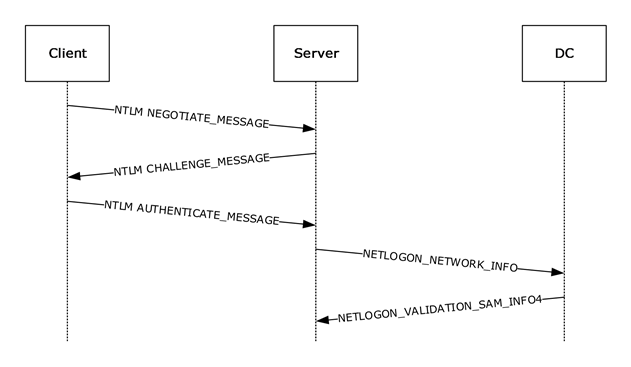
- The client sends the username to the server in plain text.
- The server generates a random number (challenge/nonce) and sends it to the client.
- The client generates a response using the user's password hash over the challenge and sends it back to the server.
- If NTLMv1 is used: Authentication is fundamentally based on the server challenge and DES-based response generation. In some Extended Session Security (ESS) scenarios, additional client-side values may enter the process, but the authentication itself still remains NTLMv1.
- If NTLMv2 is used: The client appends client challenge + timestamp + target information to the challenge and generates a stronger HMAC-MD5 based response. This structure strengthens protection against replay attacks and validation.
- The server forwards the username, challenge, and response information to the Domain Controller for validation.
- The Domain Controller retrieves the user's password hash from the SAM database and encrypts the same challenge.
- If the result calculated by the DC matches the response from the client, authentication is successful.
The NTLM protocol has three main versions:
| ID | Version | Status | Security |
|---|---|---|---|
| 1 | LM | Legacy | Very weak |
| 2 | NTLMv1 | Deprecated | Weak |
| 3 | NTLMv2 | Deprecated but Active | Relatively secure but should not be used |
Why Are LM Hash and the LM Protocol So Weak?
LM Hash was designed in 1987 and is an extremely easy-to-crack mechanism by today's standards.
Key weaknesses:
- No case sensitivity: All characters are converted to uppercase before the password is hashed. This significantly narrows the search space for brute-force attacks.
- Password is split into two halves: The password is divided into two independent 7+7 byte halves, and each half is encrypted separately with DES. An attacker can independently crack two 7-character halves instead of cracking a 14-character password.
- Short passwords are detectable: If the password is shorter than 8 characters, the second half is filled entirely with NULL values and always produces the same hash value (
AAD3B435B51404EE). When an attacker sees this constant hash, they can immediately determine that the password is 7 characters or shorter. - Fast to crack: A 7-byte DES hash can be cracked via brute-force in less than 6 hours with modern hardware.
NTLMv1 vs. NTLMv2 Comparison
There are significant security differences between these versions:
| Feature | NTLMv1 | NTLMv2 |
|---|---|---|
| Hash Algorithm | DES (56-bit) | HMAC-MD5 |
| Challenge | Server challenge only (8 bytes) | Server challenge + client challenge |
| Salt | None | Client challenge used as salt |
| Replay Protection | Weak | Strengthened with client challenge |
| Brute-Force Resistance | Low / DES-based hash is fast to crack | Higher / HMAC-MD5 structure increases resistance |
The DES algorithm used in NTLMv1 is faster by design; this allows attackers to obtain hash values from captured packets in a short time. NTLMv2, on the other hand, provides a stronger cryptographic structure using HMAC-MD5, and the additional parameters added to the challenge content (timestamp, username, target) provide protection against replay attacks. While HMAC-MD5 is not ideal by today's standards, it is significantly more secure compared to DES.
Potential Security Impact
Due to NTLMv1's weak cryptographic structure, vulnerability to Pass-the-Hash / relay attacks, and incompatibility with modern security standards, it is recommended that it not be used in current infrastructures. Continued use of NTLMv1 in enterprise networks creates the following risks:
- Rapid password cracking after credential dumping
- Pass-the-hash attacks
- NTLM relay attacks; the attacker redirecting authentication traffic to a third system to gain unauthorized access
- Man-in-the-Middle (MitM) attacks; vulnerability to interception attacks due to NTLMv1's weak session security structure
- Privilege Escalation
- Lateral movement attacks
- Weakened authentication security in the domain environment
In short, having NTLMv1 present in the environment is not in the old but working category, but rather in the unnecessary and measurable identity risk category.
Example Attack Scenario
It is possible to demonstrate why NTLMv1 poses an immediate risk through a concrete attack chain:
- Hash Capture: The attacker runs a tool such as Responder or ntlmrelayx on the network to capture NTLMv1 challenge-response traffic. LLMNR/NBT-NS poisoning or other MITM attacks can be used for this purpose.
- Hash Cracking: The captured NTLMv1 hash can be cracked within seconds using online services like crack.sh or tools like hashcat due to its DES-based structure. Rainbow table attacks are also highly effective against NTLMv1 hashes.
- Lateral Movement: With the cracked password, the attacker moves laterally to other systems that the user has access to.
- Privilege Escalation: If the captured account is a service account or an administrator account, the attacker directly gains high-privilege access.
Note: NTLMv2 hashes can also be captured, but cracking them takes significantly longer due to their cryptographic structure (HMAC-MD5 + timestamp + client challenge). Migrating from NTLMv1 to NTLMv2 significantly complicates the most critical step (hash cracking) of this attack chain.
Key Considerations for Remediation Steps
Key Messages from Microsoft
- Microsoft positions NTLMv1 as a mechanism incompatible with both legacy and modern authentication architectures.
- As of June 2024, Microsoft has marked the entire NTLM family as deprecated.
- NTLMv1 has been disabled by default with Windows 11 24H2 and Windows Server 2025.
- Microsoft is following a transition strategy that reduces NTLM dependency through auditing, gradual restrictions, and new Kerberos capabilities.
- Microsoft is moving towards making NTLM disabled by default in future Windows versions.
- The long-term goal is to reduce NTLM dependency and expand Kerberos-based authentication.
Microsoft's NTLM Transition Roadmap
Microsoft aims to reduce NTLM dependency gradually rather than all at once. The main direction visible today is as follows:
| Phase | Period | Scope |
|---|---|---|
| Phase 1 | Active | Strengthening NTLM auditing, declaring the NTLM family as deprecated, removing NTLMv1 from new platforms |
| Phase 2 | 2026 and beyond | Expanding Kerberos coverage with capabilities like IAKerb and Local KDC, reducing NTLM dependencies |
| Phase 3 | Future versions | More secure defaults where NTLM comes disabled by default becoming widespread |
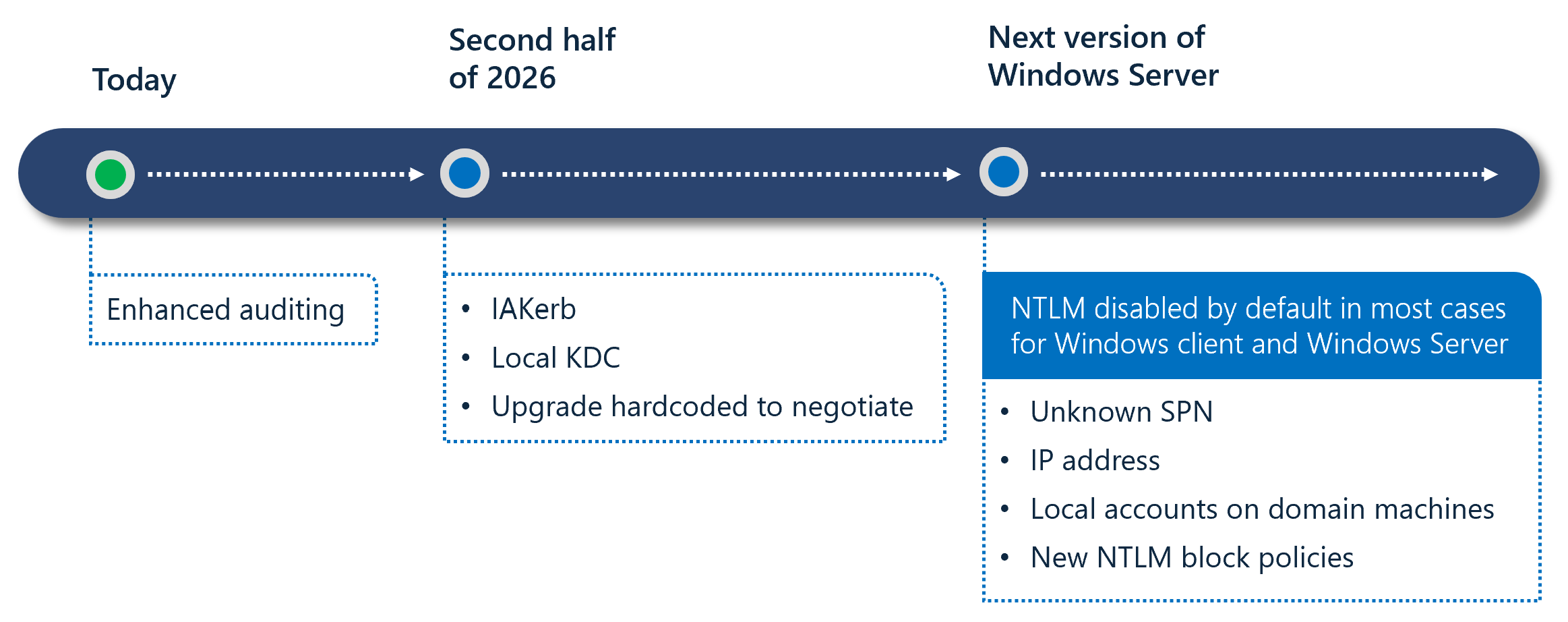
Two notable technologies stand out in this roadmap:
- IAKerb (Initial and Pass Through Authentication Using Kerberos): Enables clients without direct access to a Domain Controller to use Kerberos.
- Local KDC: Provides Kerberos support for local accounts, reducing NTLM dependency.
Note: Migrating to NTLMv2 is an intermediate step. Microsoft's long-term direction is to minimize NTLM usage as much as possible and expand Kerberos-based authentication.
Compliance and Regulations
Disabling NTLMv1 is not just a technical hardening effort, but also a requirement of various regulations and compliance frameworks:
| Regulation/Compliance | Relevant Requirement | NTLMv1 Relation |
|---|---|---|
| CIS Benchmarks | Windows Server / Workstation Level 1 | LmCompatibilityLevel = 5 mandatory |
| Microsoft Security Baselines | All Windows versions | LmCompatibilityLevel = 5 recommended |
| NIST SP 800-53 | IA-5 (Authenticator Management), SC-8 (Transmission Confidentiality) | Deprecation of weak authentication mechanisms |
| ISO 27001:2022 | A.8.5 (Secure Authentication) | Secure authentication requirement |
| PCI-DSS v4.0 | Requirement 8.3 (Strong Authentication) | Removal of weak cryptography |
| KVKK / Personal Data Protection Law | Technical Measures — Authorization and Authentication | Secure authentication requirement for access to personal data |
Credential Guard and NTLMv1 Relationship
Windows Credential Guard protects secrets in LSASS memory by isolating them, particularly NTLM hashes and other session information. When enabled, NTLMv1, MS-CHAPv2, Digest, and CredSSP with signed-in credential usage / SSO do not work. This significantly reduces NTLMv1 exposure on the endpoint side.
However, this does not mean that NTLMv1 is centrally disabled across the environment. Credential Guard is an endpoint protection; LmCompatibilityLevel is the enterprise policy layer that governs client/server/DC behavior. Therefore, enabling Credential Guard in supported environments is a strong complementary control, but it does not replace centralized GPO/Intune-based enforcement on its own.
Most Common Problem Areas During Disabling
Organizations can generally disable NTLMv1 easily via GPO; however, the difficult part is identifying in advance which legacy dependencies may cause access issues.
Most common problem areas:
| Area | Typical Problem |
|---|---|
| Legacy NAS devices | NTLMv1 dependency in SMB / scan-to-folder scenarios |
| Printers / MFP devices | Scan-to-folder via SMB share or legacy auth method |
| Old Samba versions | Default or misconfigured NTLM behavior |
| SQL Server 2008 and earlier | Named Pipes or legacy client behaviors |
| Legacy IIS / intranet applications | Silent NTLM fallback when Kerberos fails |
| SCCM / MECM | Some client push and legacy communication scenarios |
| File shares accessed via IP | NTLM fallback instead of Kerberos |
| Trust / multi-forest environments | Fallback due to SPN, trust, or different policy levels |
Most Commonly Overlooked Causes
The situations described below should be considered before enforcement is applied. If such conditions exist, access disruptions may occur at the moment enforcement is applied.
- Missing SPN (Service Principal Name): If no SPN is defined for the target service, Kerberos fails and NTLM is used.
- Duplicate SPN: If the same SPN is assigned to multiple accounts, Kerberos validation fails.
- Access via IP address: When resources are accessed via IP address instead of FQDN, Kerberos cannot be used and NTLM is used.
For these reasons, 4769 (A Kerberos service ticket was requested) and related Kerberos events should also be examined to reduce NTLM dependencies, with particular focus on analyzing failed requests and SPN issues.
- Legacy GPOs enabling NTLMv1 on modern devices
- Default authentication settings on non-Windows devices
- Kerberos access issues on remote devices outside VPN
Safe Transition Model
Disabling NTLMv1 is not a single-step security configuration. Therefore, it is recommended that organizations detect NTLMv1 usage and disable it in a controlled manner. The process should proceed through the following stages:
- Discovery — Detecting NTLMv1 usage
- Remediation — Fixing applications, devices, and configurations
- Enforce — Gradually disabling the NTLMv1 protocol
- Monitor — Establishing a persistent process through periodic monitoring
Implementation Steps
The following steps cover the fundamental stages that should be followed the controlled and safe execution of the NTLMv1 disabling process.
1. Discovery
Before disabling NTLMv1, it must be determined which systems and which applications and services within those systems are using this version.
Recommended actions:
1.1 Inventorying the Current LmCompatibilityLevel:
The NTLM protocol version is configured through a value called LmCompatibilityLevel. This value can be set manually via the Registry or centrally through Group Policy objects.
The possible values and behaviors of the LmCompatibilityLevel setting are summarized in the following table:
| Level | Client Behavior | Server / DC Behavior |
|---|---|---|
| 0 | Sends LM and NTLMv1; does not use NTLMv2 session security | DC: Accepts LM, NTLM, and NTLMv2 |
| 1 | Sends LM and NTLMv1; uses NTLMv2 session security if the server supports it | DC: Accepts LM, NTLM, and NTLMv2 |
| 2 | Sends NTLMv1 only; uses NTLMv2 session security | DC: Accepts LM, NTLM, and NTLMv2 |
| 3 | Sends NTLMv2 only | DC: Accepts LM, NTLM, and NTLMv2 |
| 4 | Sends NTLMv2 only | DC: Refuses LM; accepts NTLM and NTLMv2 |
| 5 | Sends NTLMv2 only | DC: Refuses LM and NTLMv1; accepts NTLMv2 only |
Warning: Values between Level 0-2 allow the client to use NTLMv1. In particular, although Level 2 improves session security, the authentication itself still remains NTLMv1 and does not provide adequate security. The minimum target should be Level 3.
Warning — NTLMv1 + ESS Misconception: The Extended Session Security (ESS/NTLMv2 Session Security) enabled at Level 2 may appear to provide additional protection over NTLMv1, but the authentication mechanism itself still remains DES-based NTLMv1. ESS only strengthens session key generation; it does not change the challenge-response structure. Therefore, the assumption that "we use NTLMv1 + ESS, so we are safe" is incorrect. Migration to NTLMv2 (Level 3+) is required to protect against hash capture and cracking attacks.
Note: Levels 0-3 control what the client sends in the NEGOTIATE_MESSAGE, while Levels 4-5 control what the server/DC accepts at the CHALLENGE_MESSAGE stage.
The LmCompatibilityLevel registry key may not exist on the system by default. If this key is not present, the system's behavior is determined by the Windows version in use:
| Operating System | Default Value | Behavior |
|---|---|---|
| Windows 2000 / XP | 1 | NTLMv1 is used |
| Windows Server 2003 | 2 | NTLMv1 + NTLMv2 session security |
| Windows Vista / Server 2008 and later | 3 | NTLMv2 only |
As shown in this table, operating systems prior to Vista/Server 2008 use NTLMv1 by default. If a legacy GPO exists in the environment, the NTLM settings of current Windows versions can also be downgraded. Existing policies must be reviewed to ensure that legacy GPOs are not downgrading modern systems.
The first step in the NTLMv1 disabling process is to report the current LmCompatibilityLevel values from all systems in the environment in bulk. The following methods can be used to collect this value from all systems.
- All Group Policy objects configuring the relevant setting are identified, along with which computers they are applied to.
- The registry value is centrally queried from computers through an agent already installed on them.
- The registry values are queried via network access to all computers using a PowerShell script.
These steps often require manual effort and therefore cannot be performed quickly or cover all systems.
In addition to these operations, the discovery step can be quickly performed using the Identity Risk Assessment, GPO Audit, and Search & Report modules of Forestall ISPM.
Forestall ISPM automatically detects Group Policy objects that contain insecure NTLM version configurations and which devices they affect. To access the relevant output, navigate to the
Issuespage and check theInsecure LM/NTLM Authentication Levelvulnerability. Within the vulnerability, you can see which Group Policy object applies which insecure setting to how many different computers.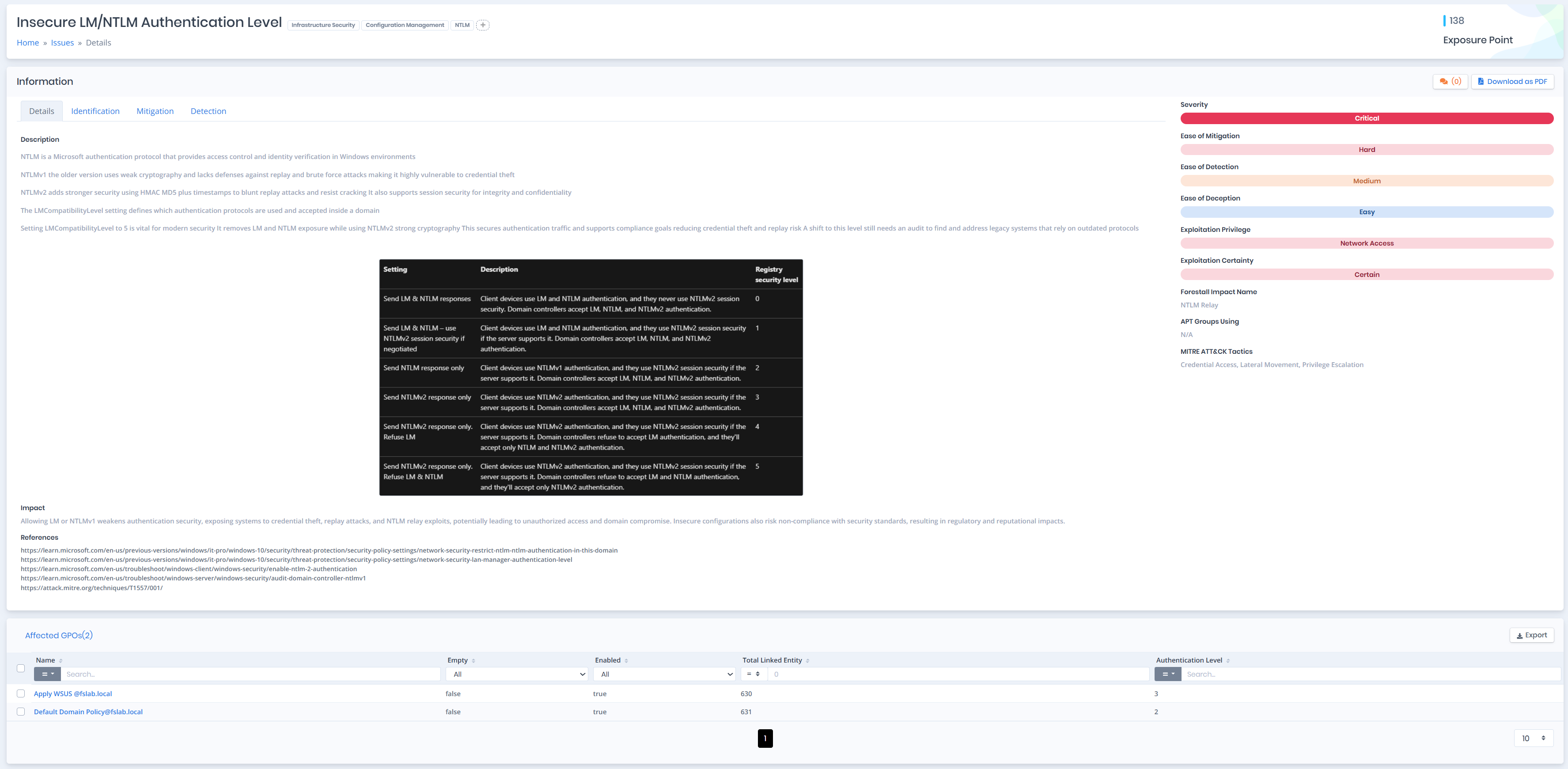
As an example, in the vulnerability detail, it can be seen that the GPO named Apply WSUS applies the LmCompatibilityLevel value as 3 to 630 different objects.
In the next stage, navigate to the
Search & Reportspage to identify which computers the insecure GPOs are applied to. To perform this detection, follow the steps below to write the necessary query.On the
Search & Reportsscreen, click the New Query button located in the upper right section. On the screen that opens, select GPO as theSelect Entity Typevalue.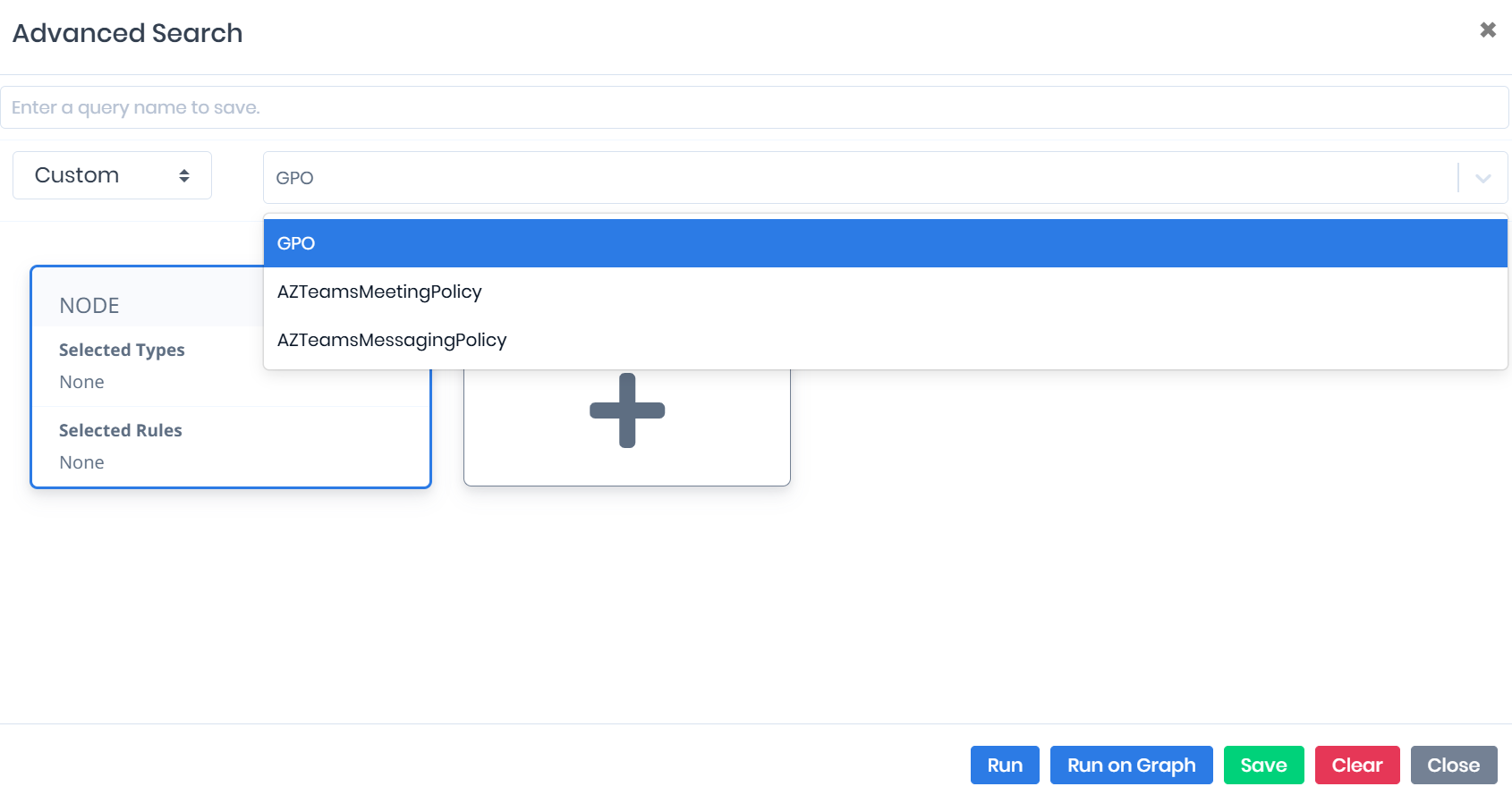
Then click the +Rule area and select the FSName filter from the Select Your Option screen that opens. Then select the Like or Equal operator and enter the GPO name that was identified as vulnerable.
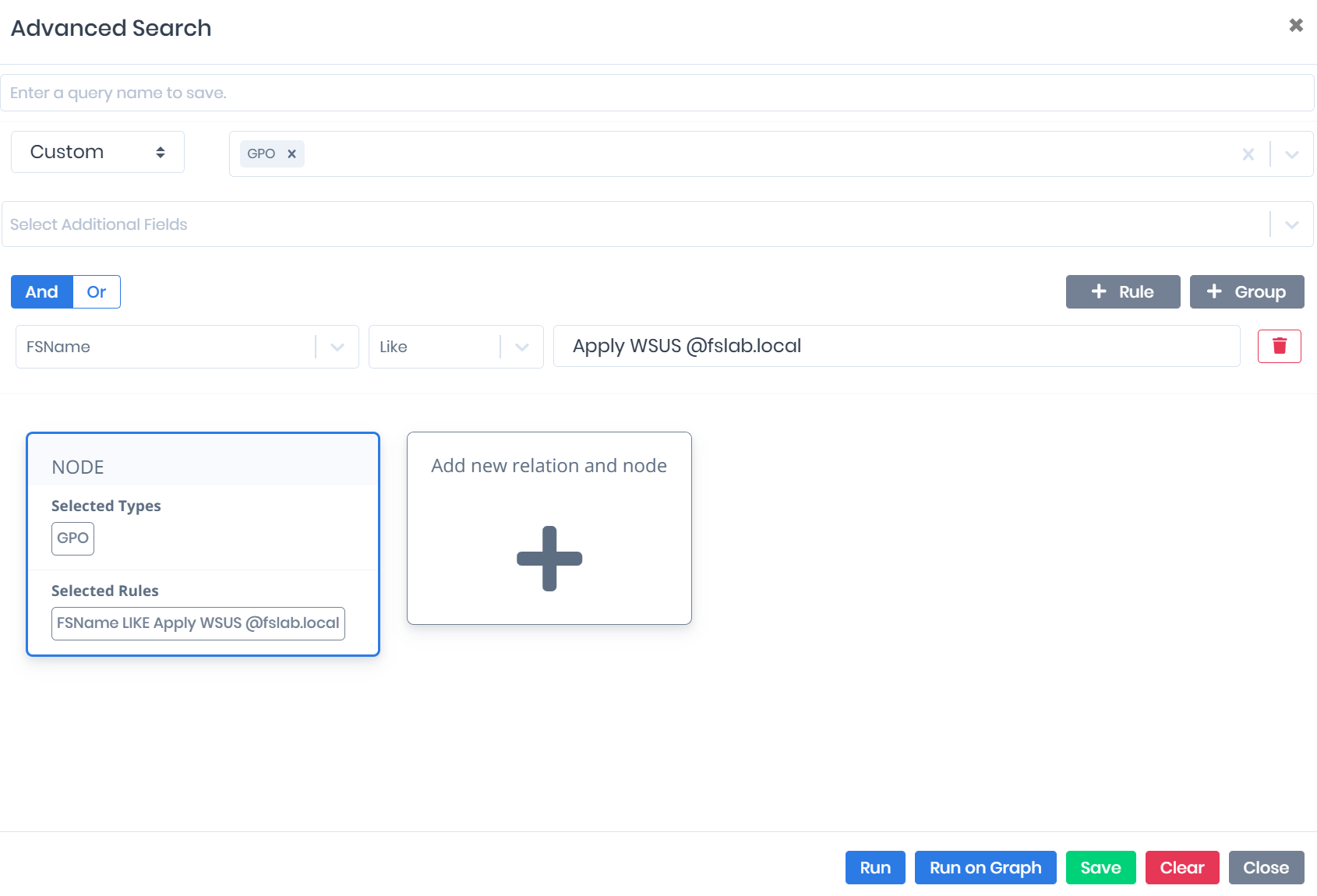
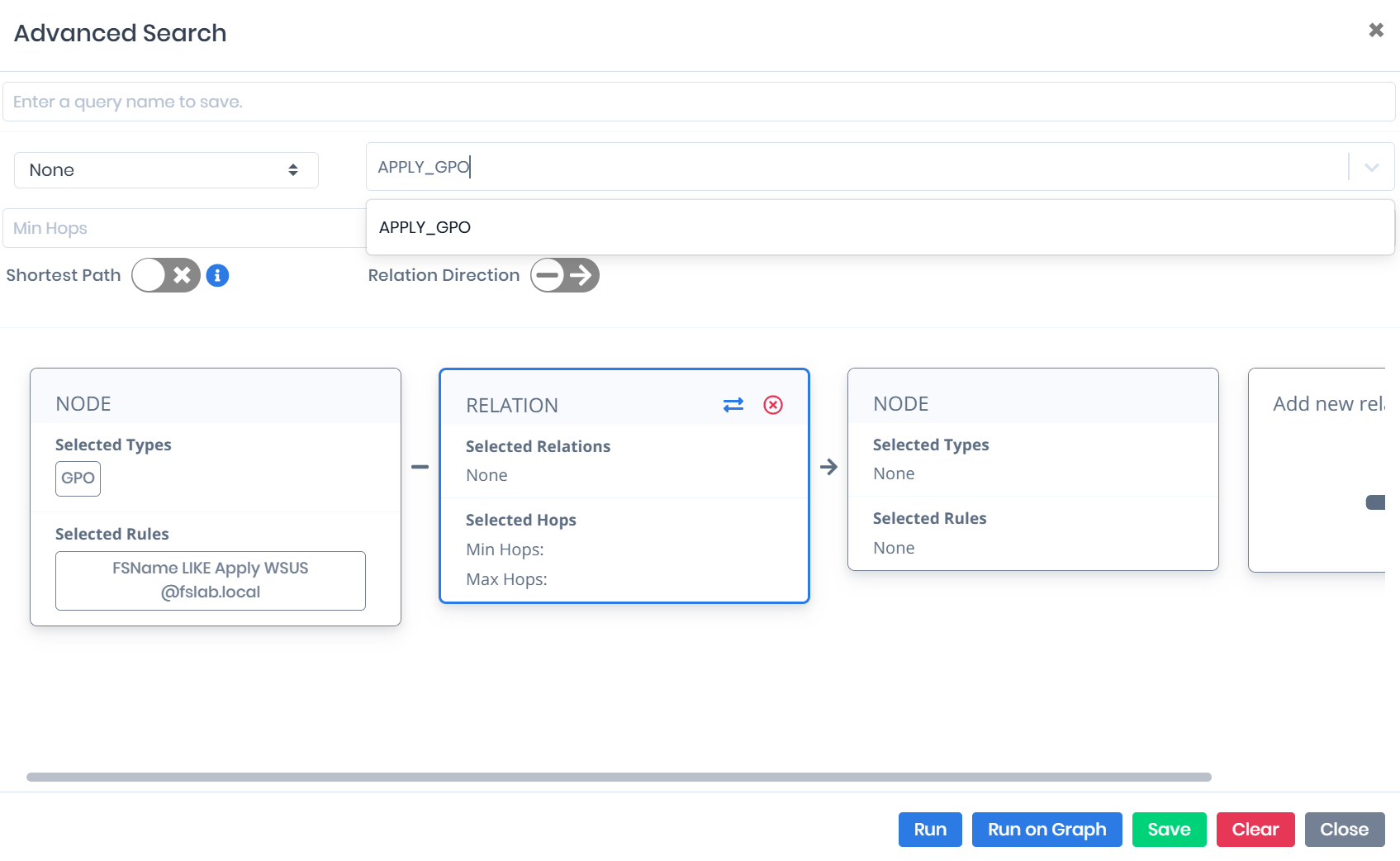
In the next step, click the Relation area (Add new relation and node) and select Apply_GPO as the relationship type. This selection includes which entities the specified GPOs are applied to in the query on a relationship basis.
Click the Node area on the right side. Then select Computer from the Entity Type list at the top and click the Run button to execute the query. This completes the query to show the target systems on a per-computer basis to which the vulnerable GPOs are applied.
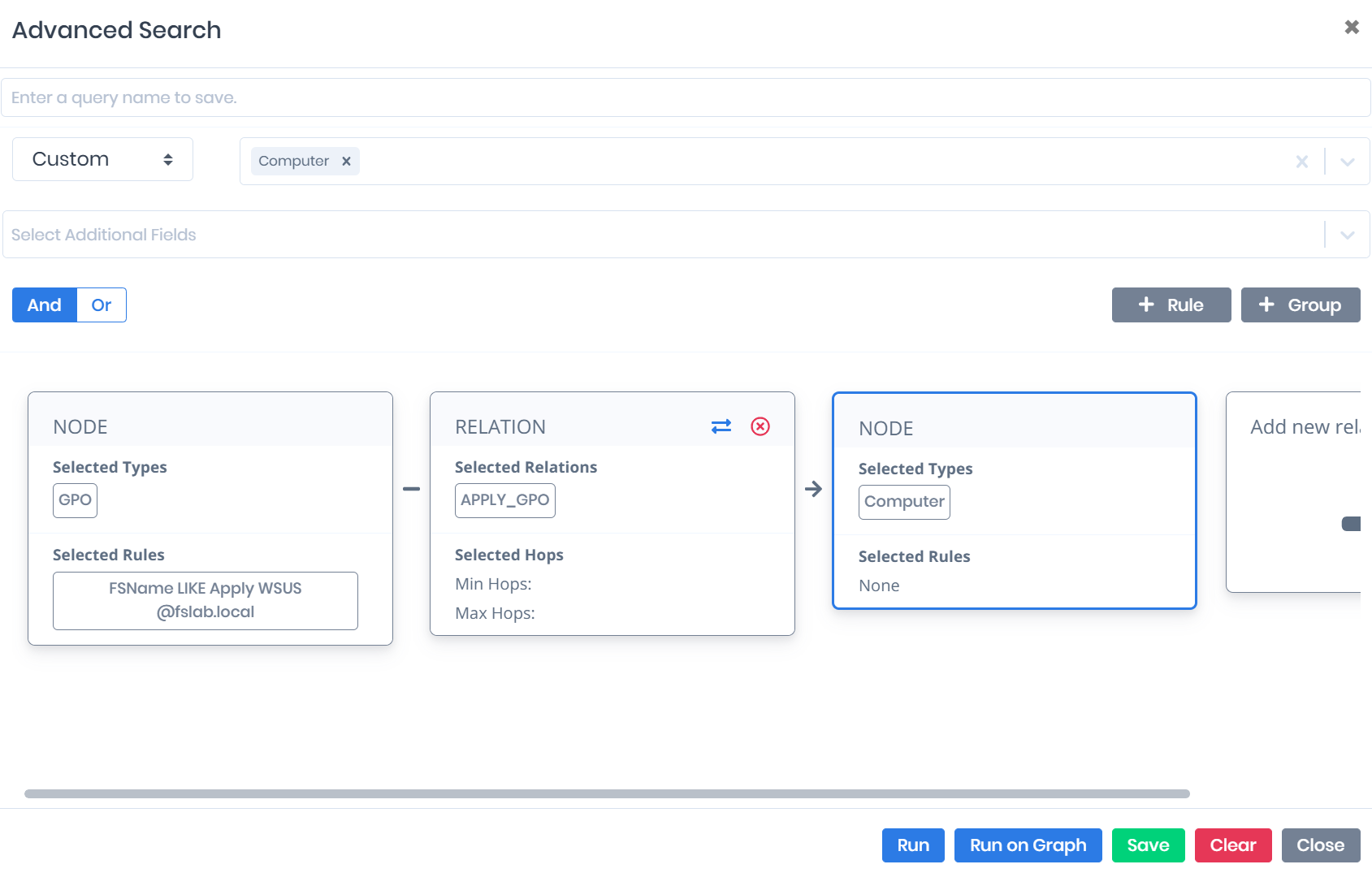
Through this query structure, the computers to which the GPOs applying the
LmCompatibilityLevelvalue insecurely (allowing the NTLMv1 protocol) can be clearly viewed. Additionally, the relevant list can be exported in Excel format using the Export function.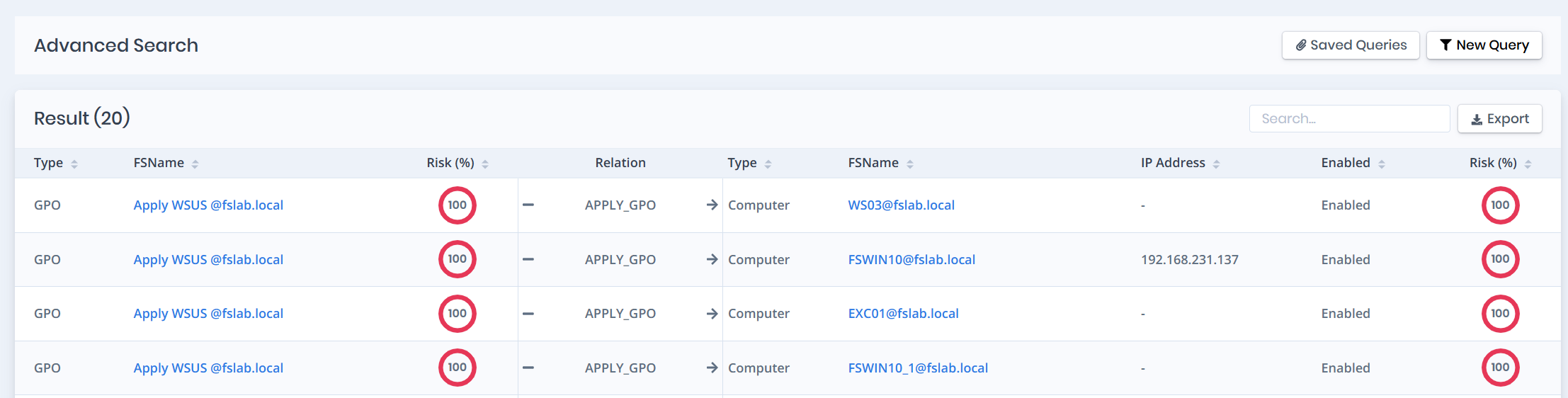
Within the
GPO Auditmodule, aBaselineis created that only checks the status of theLmCompatibilityLevelsetting. Then navigate to theRSOP Auditpage and compare all computers against thisBaselineto identify computers with insecure configurations. This interface also shows which Group Policy object the insecure configuration originates from.Navigate to the Custom Baselines page under the GPO Audit module. Click the New Baseline button and name the new baseline (NTLMv1 Discovery). Since the OS field is irrelevant in this scenario, select Other. To simplify the process, select Forestall - FSBaseline General v1 as the Baseline Template. Click the Save button to create the new baseline.
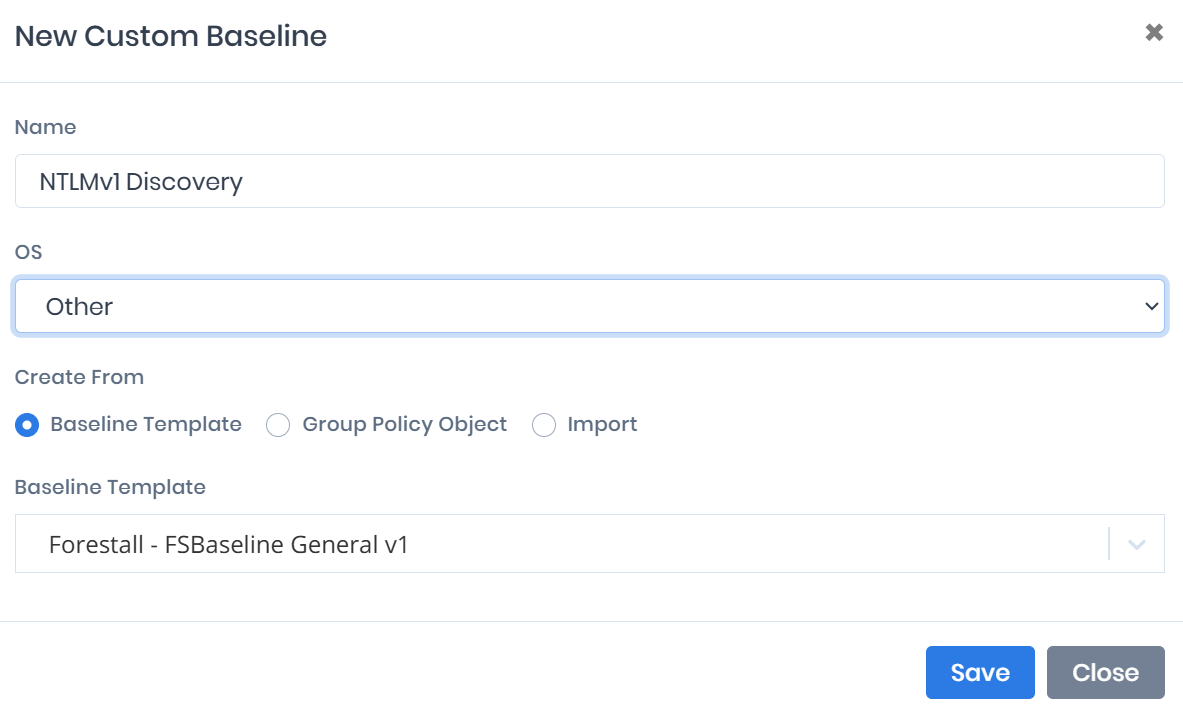
Click on the newly created baseline from the Custom Baselines page to go to the detail page. First, increase the number of rows displayed in the table, then check the select all checkbox in the leftmost column. Then uncheck only the
LmCompatibilityLevelsetting. Select the Delete option from Bulk Actions in the upper right section and click the Apply button. After this operation, the relevant baseline will only check theLmCompatibilityLevelsetting.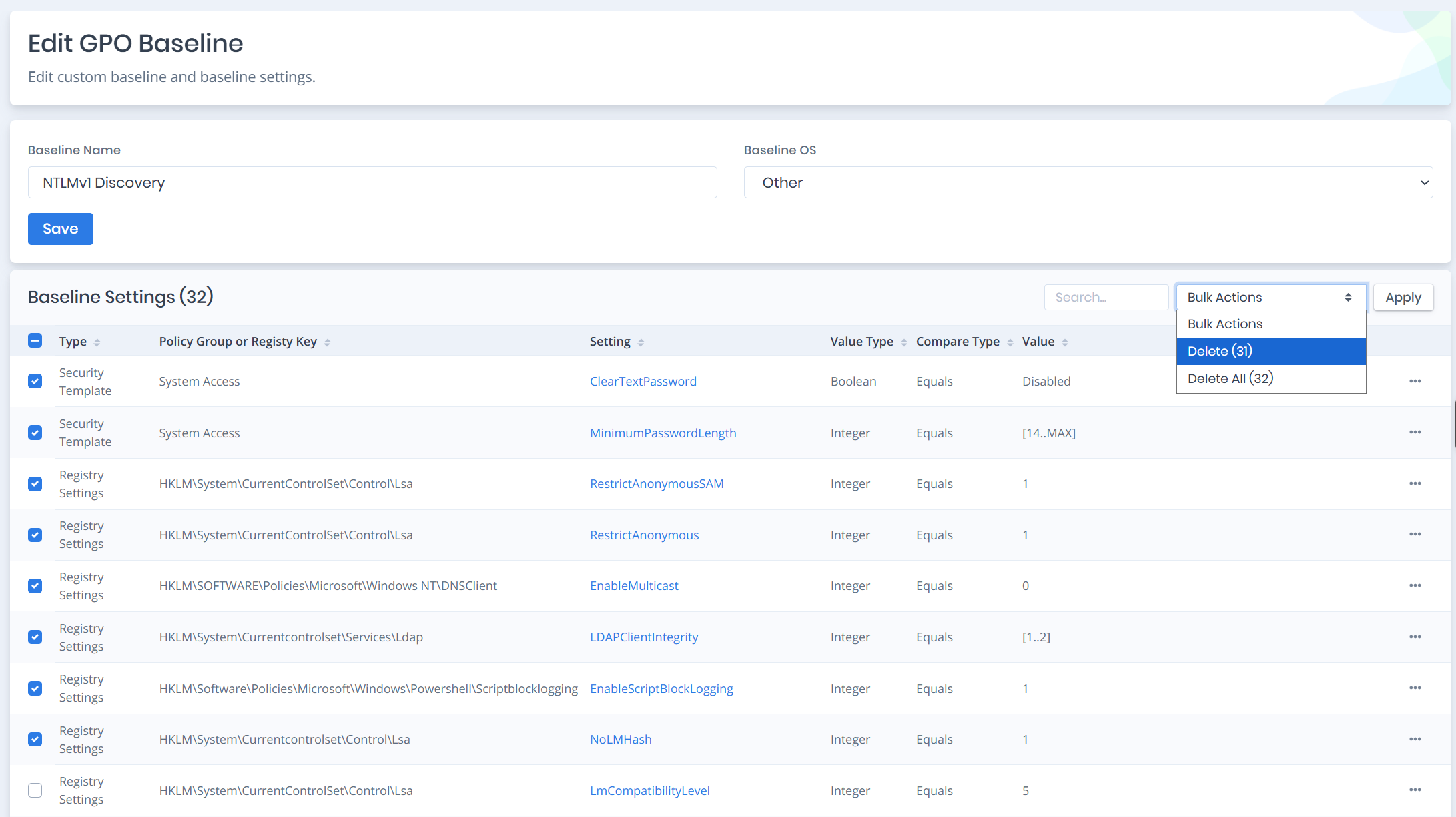
To detect computers with
LmCompatibilityLevelset to 1 or 2, click the three dots on the far right of the relevant row, then click the Edit button. On the page that opens, select Regex as the Compare Type value and enter^[^12]$as the regex value in the Value field. Click the Save button to save the setting. Different checks can also be performed by entering different values in the Regex field.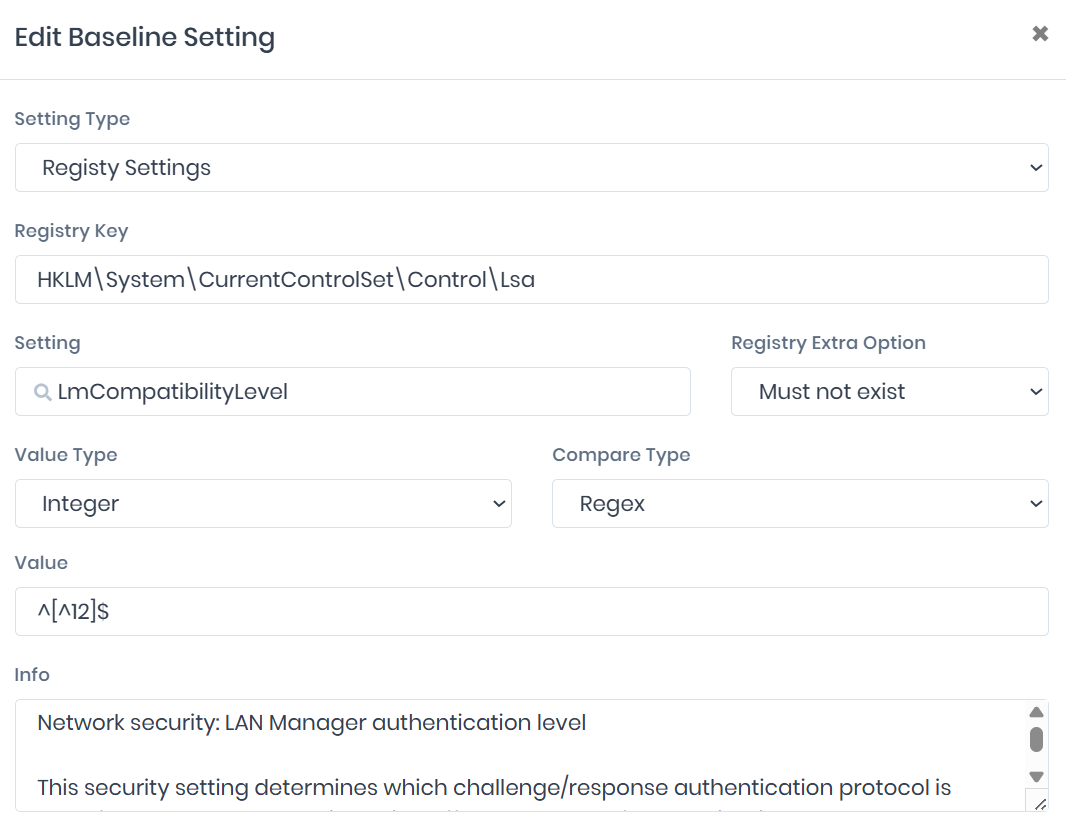
To perform the comparison, navigate to the RSOP Comparison page. Select the newly created baseline from the Baseline option in the upper right. When the baseline is selected, the check is automatically performed and computers that are not compliant with the created baseline can be seen with their Uncompatible column showing 1.
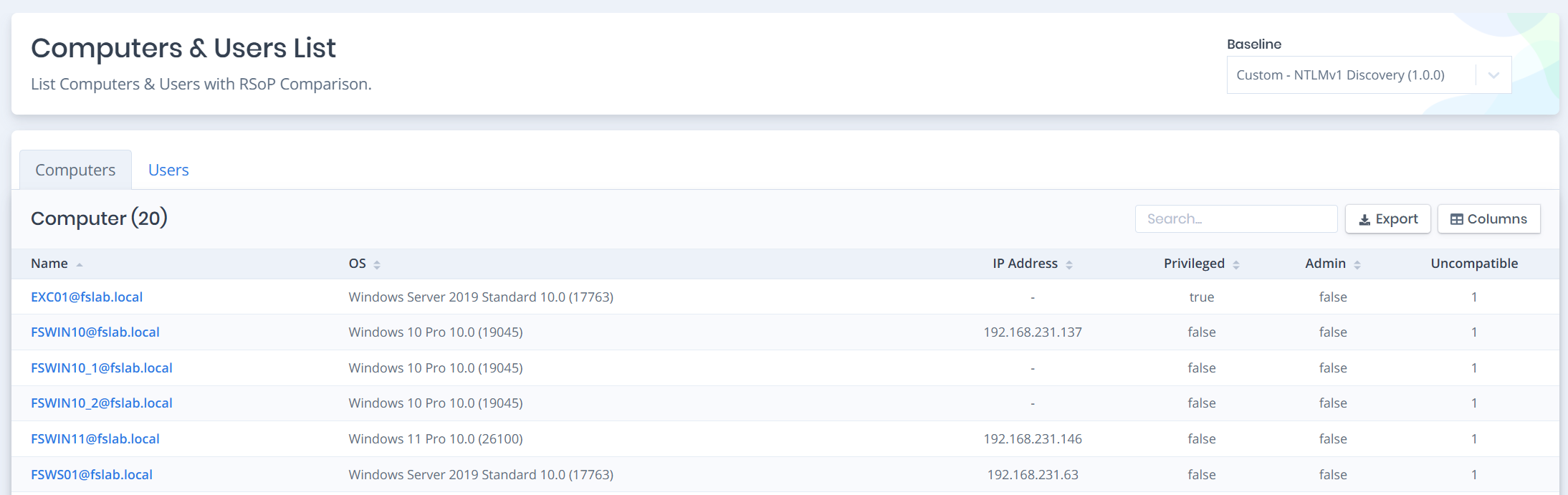
Click on any desired computer detail to see the details. Click on the Uncompatible filter marked in red in the upper right section; this filter will show how the
LmCompatibilityLevelvalue is configured in the GPO Value column and which GPO delivered it to this computer in the Winning GPO column.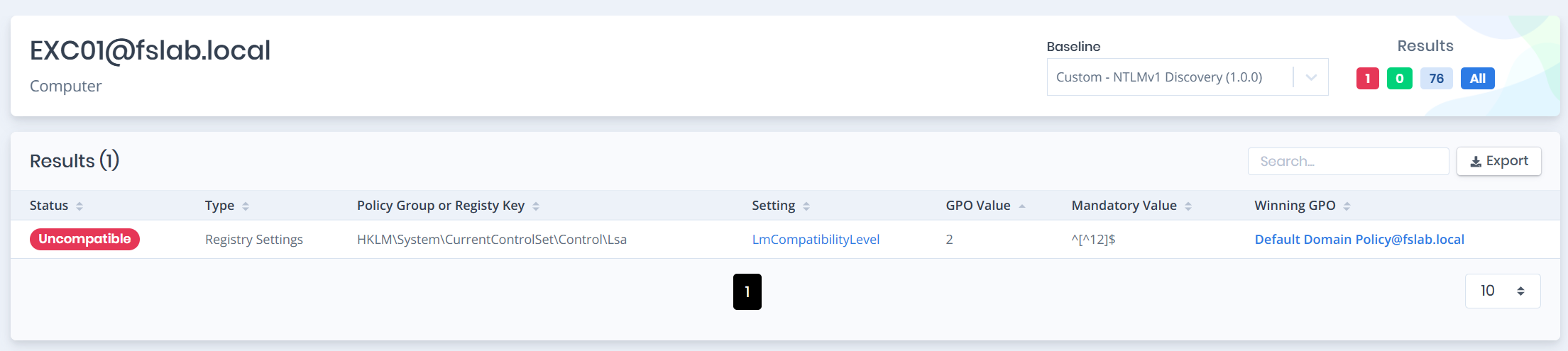
As an alternative to these methods, the following PowerShell script can be used to query the relevant value from all servers and clients.
Note: For this script to run,
RSATorPowerShell ActiveDirectoryModulemust be installed on the computer where the command is executed.
Note: For this script to work properly, the user must have at least
Registryread permissions on the target computers.
# Report LmCompatibilityLevel values from all computers in the environment
$Computers = Get-ADComputer -Filter * -Properties OperatingSystem |
Select-Object Name, OperatingSystem

$Results = foreach ($Computer in $Computers) {
    $Level = Invoke-Command -ComputerName $Computer.Name -ErrorAction SilentlyContinue -ScriptBlock {
        $RegPath = 'HKLM:\System\CurrentControlSet\Control\Lsa'
        $Value = Get-ItemProperty -Path $RegPath -Name 'LmCompatibilityLevel' -ErrorAction SilentlyContinue
        if ($Value) { $Value.LmCompatibilityLevel } else { 'Not Set (OS Default)' }
    }
    [PSCustomObject]@{
        ComputerName     = $Computer.Name
        OperatingSystem  = $Computer.OperatingSystem
        LmCompatLevel    = $Level
    }
}

$Results | Sort-Object LmCompatLevel |
Format-Table -AutoSize
$Results |
Export-Csv -Path "LmCompatibilityLevel_Inventory.csv" -NoTypeInformation -Encoding UTF8

# Summary report
$Results |
Group-Object LmCompatLevel |
Sort-Object Count -Descending |
Select-Object Count, Name |
Format-Table -AutoSize
Note: The behavior of systems showing
Not Set (OS Default)depends on the operating system version (default Level 3 for Vista/2008+). These results enable quick identification of systems that have been downgraded by legacy GPOs in the environment.
1.2 Detecting NTLMv1 Traffic via Event Logs:
To analyze NTLM-based authentications, 4624 (Logon) security events must be collected in the environment. When a user or service authenticates to a server or a resource-hosting endpoint, the corresponding 4624 event is recorded in that system's Security log. Therefore, for comprehensive analysis, 4624 logs must be collected not only from member servers but from all servers and endpoints hosting resources.
The 4776 event generated on the Domain Controller side indicates an NTLM validation attempt, but does not contain the NTLM version used. Therefore, 4624 logs are critically important for analyzing NTLMv1 usage.
The Computer Configuration > Policies > Windows Settings > Security Settings > Advanced Audit Policy > Audit Policy > Logon/Logoff > Audit Logon policy must be enabled for 4624 logs to be generated:
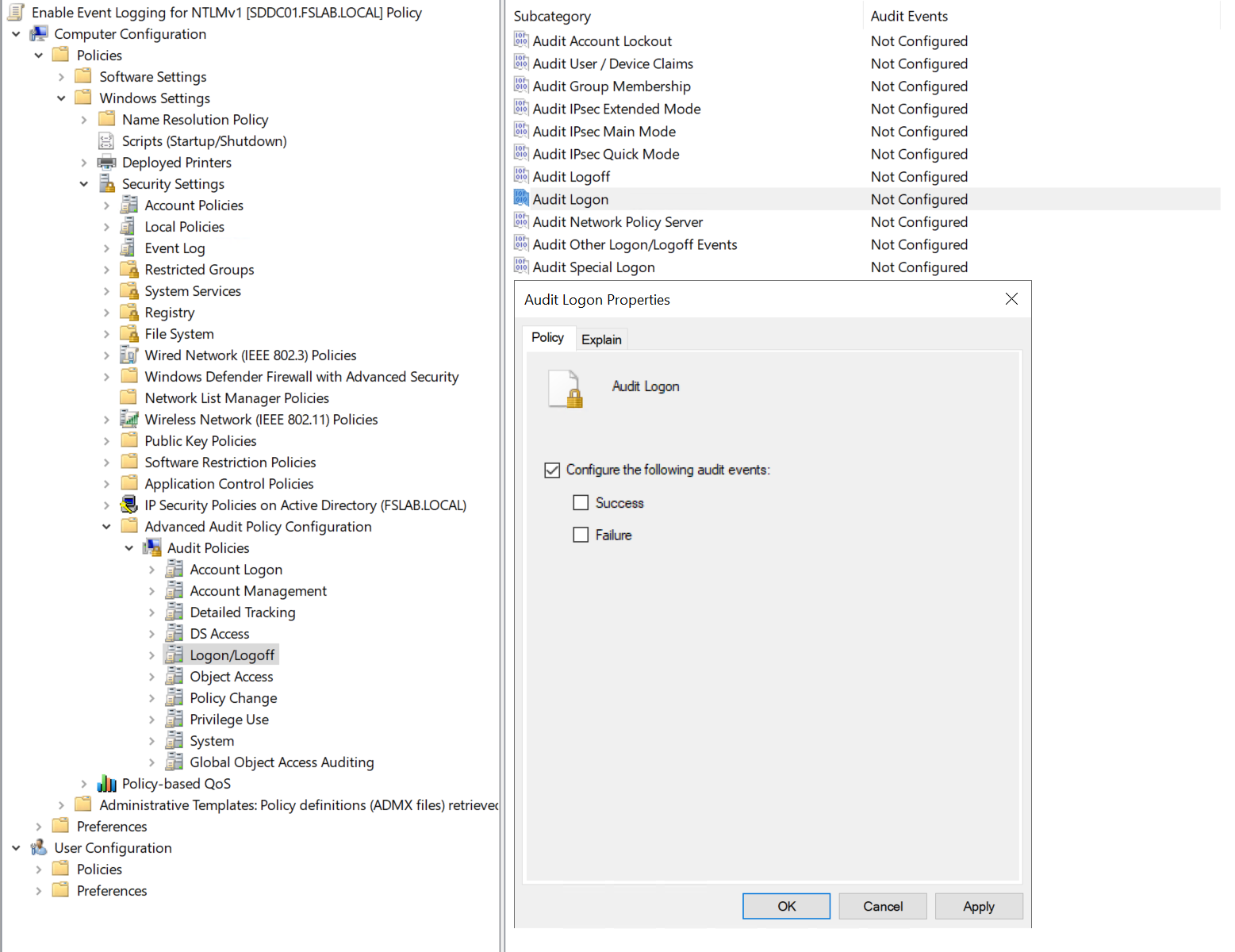
When this policy is enabled, systems will start generating 4624 logs. Through these logs, logon events using NTLMv1 can be detected.
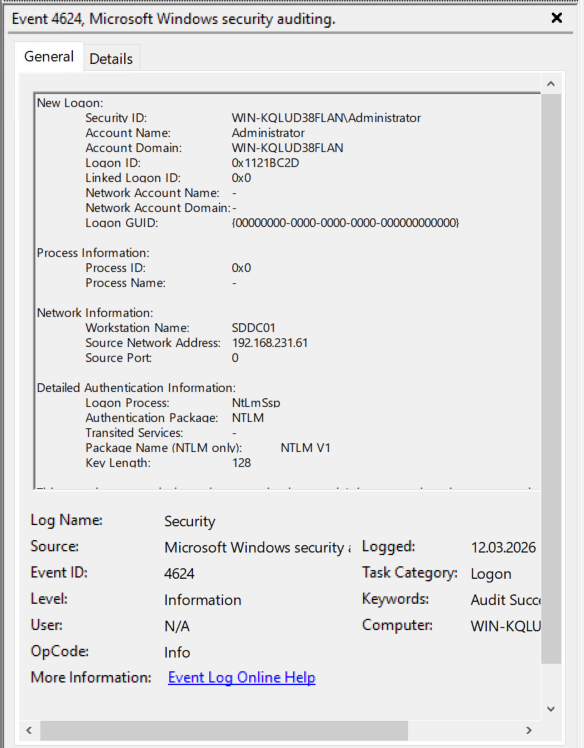
With the help of a SIEM solution, 4624 events can be centrally collected and rules to detect NTLMv1 traffic can be written. This enables centralized analysis of which systems, applications, or service accounts are using NTLMv1. The following Sigma rule can be used for this purpose.
title: NTLMv1 Authentication Detected
id: b4efd38b-7a7a-45ad-9914-f677f9071f34
description: Alert triggers when the NTLM request is made with insecure version 1.
version: 1
ttp: T1550  # custom field — not part of the official Sigma specification
status: experimental
performance: high  # custom field — not part of the official Sigma specification
author:
  - linkedin: serdal-tarkan-altun
  - twitter: TarkanSerdal
date: 2026/03/09
references:
  - https://learn.microsoft.com/en-us/previous-versions/windows/it-pro/windows-10/security/threat-protection/auditing/event-4624
  - https://techcommunity.microsoft.com/blog/coreinfrastructureandsecurityblog/active-directory-hardening-series---part-1-%E2%80%93-disabling-ntlmv1/3934787
tags:
    - attack.credential_access
    - attack.t1550
logsource:
  product: windows
  service: security
  definition: "Requires Audit Logon policy enabled (Computer Configuration > Policies > Windows Settings > Security Settings > Advanced Audit Policy > Logon/Logoff > Audit Logon)"
detection:
  selection:
    EventID: 4624
    AuthenticationPackageName: NTLM
    LmPackageName|contains: 'NTLM V1'
  filter_anonymous:
    TargetUserName: 'ANONYMOUS LOGON'
  condition: selection and not filter_anonymous
falsepositives:
  - Anonymous Logon sessions (filtered by rule)
  - Some environments where 4624 field interpretation is misleading without correlation
level: high
Important: To accurately detect NTLMv1 usage, 4624 events must be collected not only from DCs but from all member servers and clients. A 4624 event for an authentication to a server is written to that server's own log.
Important: If all Domain Controllers in your environment are running Windows Server 2025, enhanced logs can be enabled. These logs (4020, 4021, 4022, 4023, 4030, 4031, 4032, 4033) make NTLM authentication traffic more visible and facilitate the detection of NTLMv1 dependencies. Additionally, thanks to the 4032 log, there is no need to enable the 4624 log on all clients and servers. This can also accelerate the process.
Warning — False Positive: ANONYMOUS LOGON sessions in 4624 logs may appear as NTLMv1, but these are not actual NTLMv1 user authentications. These records should be filtered out.
Warning: Microsoft states that in some scenarios, the
LmPackageName = NTLM V1information in 4624 events should not be interpreted as definitive evidence on its own. For critical decisions, this signal should be correlated with network traffic, Restrict NTLM events (8001-8004), or additional DC telemetry.
In addition to the LmCompatibilityLevel setting, Microsoft provides additional GPO policies to audit and restrict NTLM usage at a more granular level. These policies provide more detailed data than 4624 logs for identifying which systems are using NTLM during the audit phase:
| Policy | Description | Event ID |
|---|---|---|
Network security: Restrict NTLM: Audit NTLM authentication in this domain |
Audits all NTLM authentications within the domain | 8004 |
Network security: Restrict NTLM: Audit Incoming NTLM Traffic |
Audits incoming NTLM traffic to the server | 8001, 8002 |
Network security: Restrict NTLM: Outgoing NTLM traffic to remote servers |
Audits/blocks outgoing NTLM traffic from the client | 8003 |
Network security: Restrict NTLM: NTLM authentication in this domain |
Blocks NTLM usage at the domain level | 8004 |
These policies should first be enabled in "Audit" mode and the generated 8001-8004 Event IDs should be analyzed. These logs will show which application is using NTLM to which server with which user account.
The relevant configurations must be enabled at the Computer Configuration > Policies > Windows Settings > Security Settings > Local Policies > Security Options path for the specified logs to be generated.
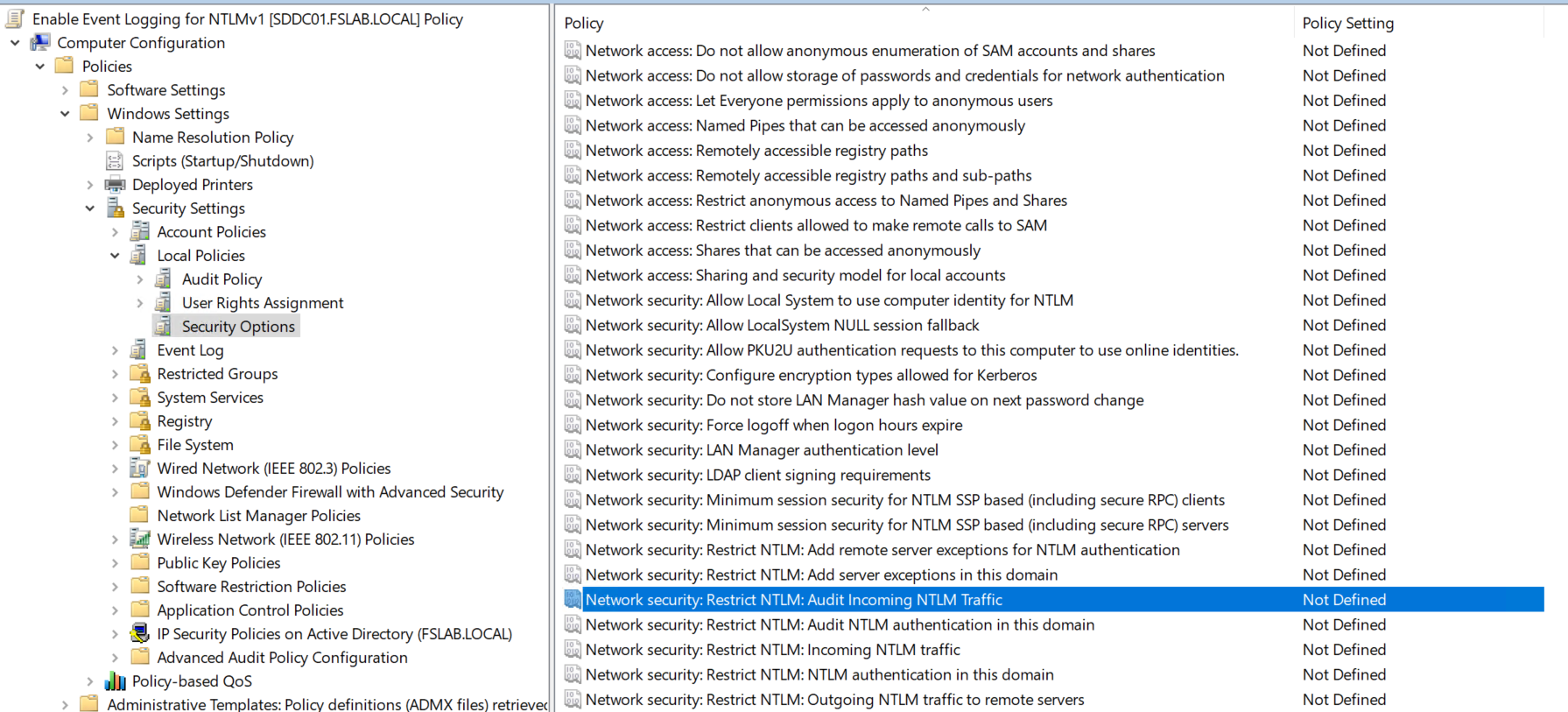
The relevant logs can be viewed in Event Viewer at Event Viewer > Applications and Services Logs > Microsoft > Windows > NTLM > Operational.
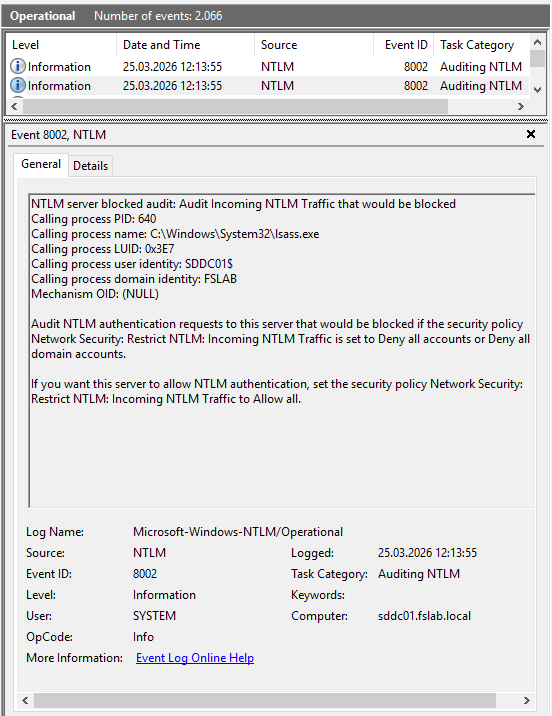
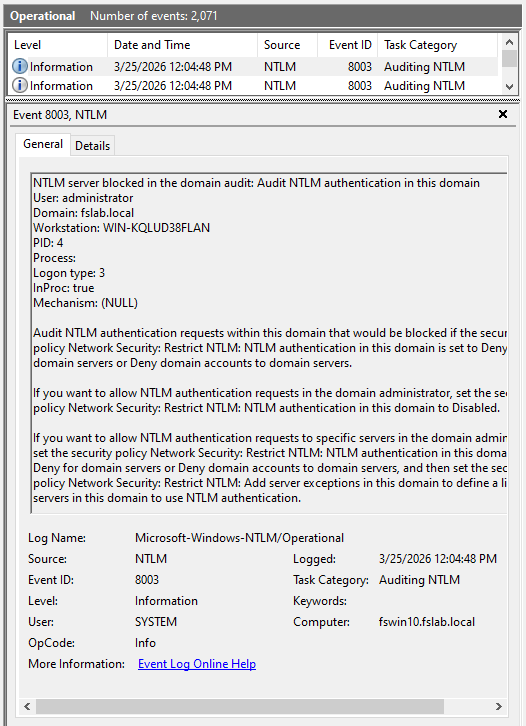
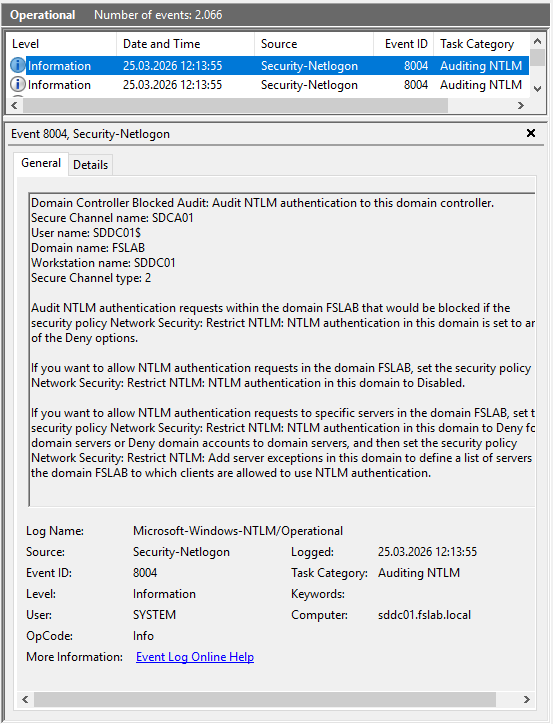
Note: These policies are not specific to NTLMv1 — they cover all NTLM usage (v1 and v2). Beyond the NTLMv1 disabling effort, these policies are also critically important for long-term NTLM elimination.
1.3 Detecting NTLMv1 Traffic Through Additional Sources
In addition to event logs, NTLMv1 traffic can also be detected at the network level. This method is critically important especially for legacy systems where logs cannot be collected or for network segments outside SIEM coverage.
Wireshark: NTLMSSP packets on the network can be analyzed using Wireshark or a similar product:
- Filter:
ntlmssp.messagetype == 0x00000003(AUTHENTICATE_MESSAGE) - The presence of the NtlmV1Response field in the NTLMSSP packet indicates NTLMv1 usage.
- The NtlmV2Response field indicates the NTLM version.
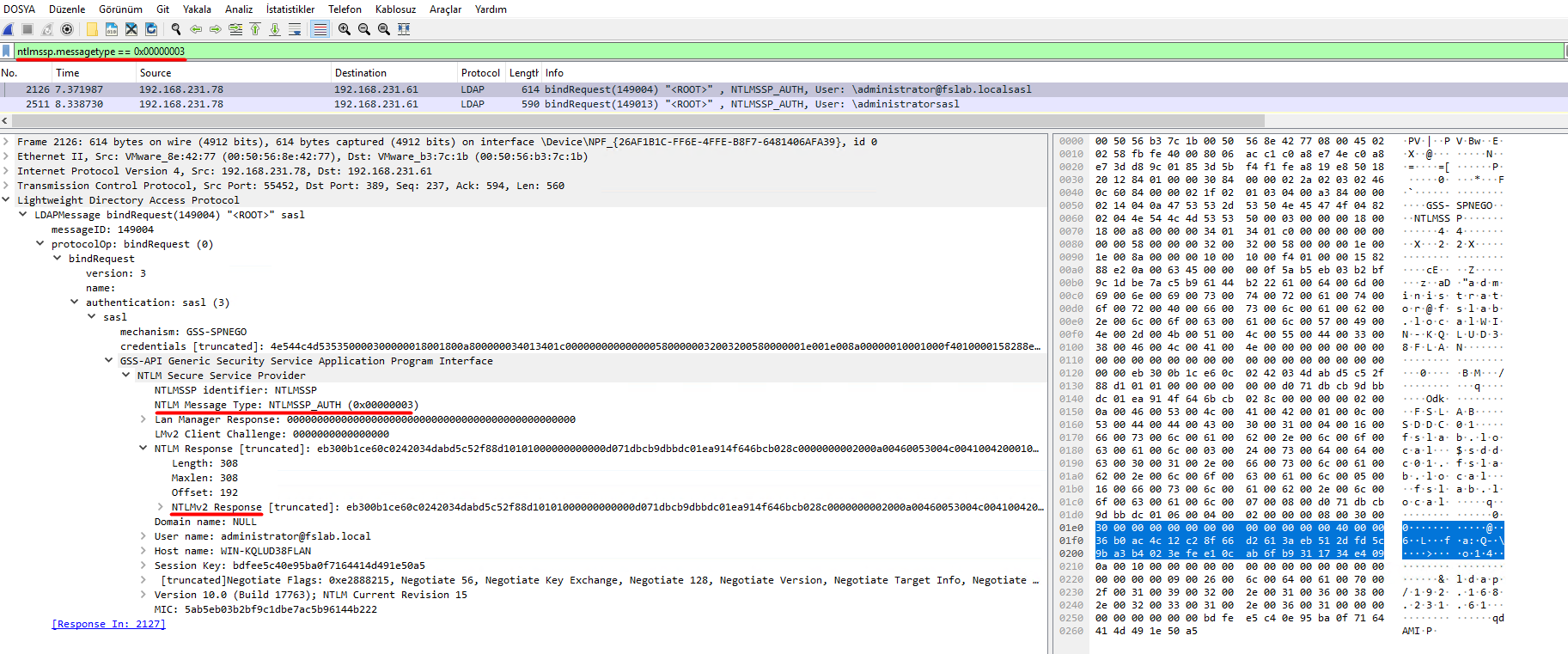
NDR (Network Detection and Response) Solutions: NDR solutions that continuously monitor network traffic in enterprise environments can automatically perform NTLM version detection. These tools:
- Can detect NTLMv1 usage in real-time and generate alerts.
- Can visualize which client is authenticating to which server using NTLMv1.
- Can capture NTLM traffic from systems where event logs cannot be collected.
After the detection process is initiated through the mechanisms described above, analysis should continue for a certain period (e.g., 1 month). During this period, the servers, applications, devices generating NTLMv1 traffic and the reasons why these clients are generating NTLMv1 traffic should be identified.
2. Remediation
After Discovery, dependencies must be removed step by step through the necessary methods (e.g., version upgrade, source code changes, configuration changes, etc.).
NTLMv1 dependencies are most often found in non-Windows systems or legacy Microsoft services. Below are some examples of dependencies.
Non-Windows systems:
- NAS devices (Synology, QNAP, etc.)
- Printers and MFP devices (scan-to-folder, SMTP relay)
- Legacy applications
- Linux / Samba systems (older Samba versions may use NTLMv1 by default)
Microsoft services and applications:
| Service | NTLMv1 Risk Area |
|---|---|
| SQL Server | NTLM fallback in older versions (2008 and earlier) or connections over Named Pipes |
| IIS | Legacy web applications running with Windows Authentication module |
| Exchange | OWA, ActiveSync, Autodiscover — especially on legacy CAS servers |
| SCCM/MECM | NTLM usage in client push installation and site-to-site communication |
| Print Services | NTLMv1 fallback during Point and Print driver installations |
| ADFS | NTLM usage in intranet authentication scenarios |
| DFS | NTLM fallback in DFS referral and namespace access |
Important Note: If there are servers and systems in the environment that must use NTLMv1, these should also be documented and subjected to an exclusion process. However, if these systems access DC servers, the NTLMv1 disabling process cannot be completed. Therefore, when such a situation is encountered, alternative scenarios should be developed for these systems and the need for DC access should be eliminated in some way.
3. Enforcement
In this step, the necessary configuration changes should be applied step by step for systems from which NTLMv1 dependencies have been removed.
Directly blocking NTLMv1 on the Domain Controller can cause authentication issues in some applications and services. Therefore, changes should be applied carefully and gradually in the order of clients, servers, and Domain Controllers.
Critical Warning — Account Lockout Risk: When a DC is configured with
LmCompatibilityLevel = 5, requests coming via NTLMv1 are treated as failed password attempts. Due to the retry behavior on the client side, this can lead to rapid account lockouts. In Microsoft's tests, it was observed that a single NTLMv1 SMB connection generated 46 failed logon attempts. Therefore, applying Level 5 on DCs should be done after all clients have been migrated to Level 3 or above.
The correct implementation order for the NTLMv1 disabling process:
- Configuring clients to use NTLMv2 (
LmCompatibilityLevel = 3) - Preventing servers from accepting NTLMv1 (
LmCompatibilityLevel = 5) - Applying full enforcement on Domain Controllers (
LmCompatibilityLevel = 5) - Preventing clients from accepting NTLMv1 (
LmCompatibilityLevel = 5)
It is recommended that the NTLMv1 disabling operation be performed through Group Policy (GPO) as follows.
If there are Group Policy objects with insecure configurations (
LmCompatibilityLevel less than 3) applied to clients, the following operations are performed on those objects.The Group Policy Management Console (GPMC) is opened with administrator privileges.
The Computer Configuration > Policies > Windows Settings > Security Settings > Local Policies > Security Options > Network Security: LAN Manager Authentication Level policy details are opened.
The Send NTLMv2 response only policy is configured.
The updated GPO is applied to the relevant clients.
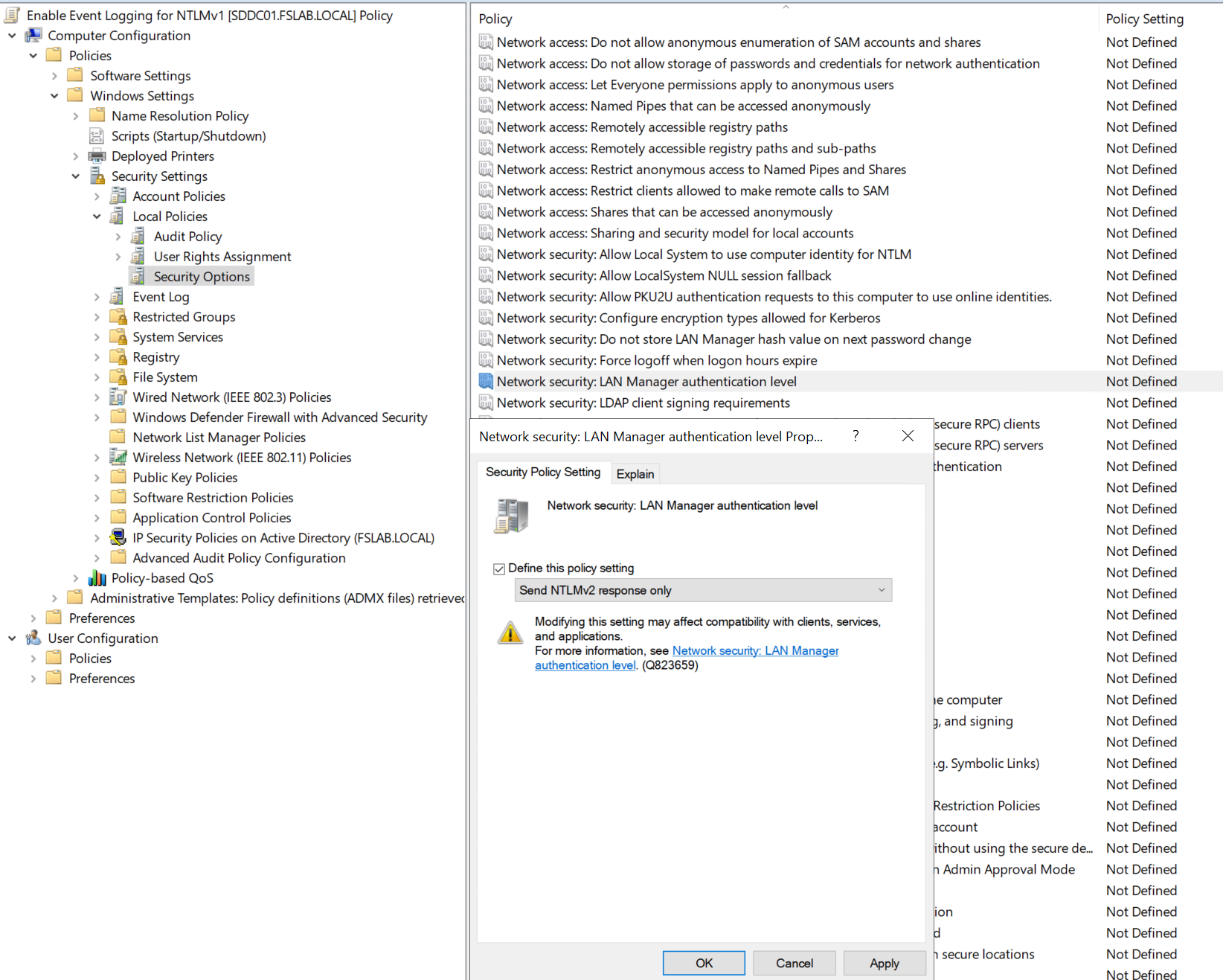
After this setting is applied, further analysis should continue for a certain period. If no access disruptions occur during this analysis period, these settings are expanded to other clients.
After the application is applied to all clients, the same setting is applied to servers as LmCompatibilityLevel = 5. After another period of analysis, if no access issues occur, it is also configured as LmCompatibilityLevel = 5 on Domain Controller servers.
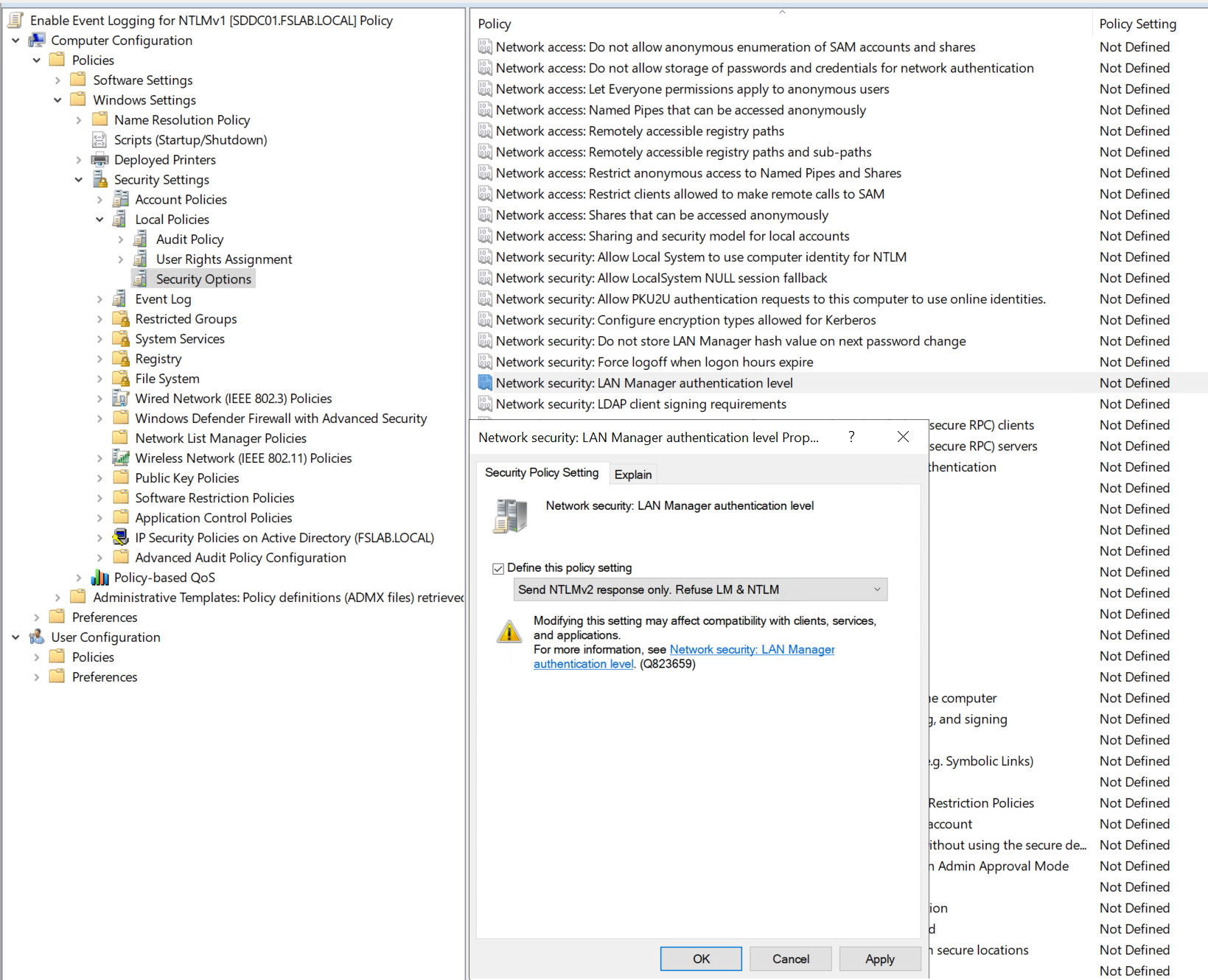
For devices not managed via GPO but managed through Microsoft Intune or other MDM solutions, LmCompatibilityLevel can be configured using the following methods:
Settings Catalog (Recommended):
In the Intune admin center, navigate to Devices > Configuration > Create > New Policy.
Select Windows 10 and later as the platform, Settings Catalog as the profile type, and click Create.
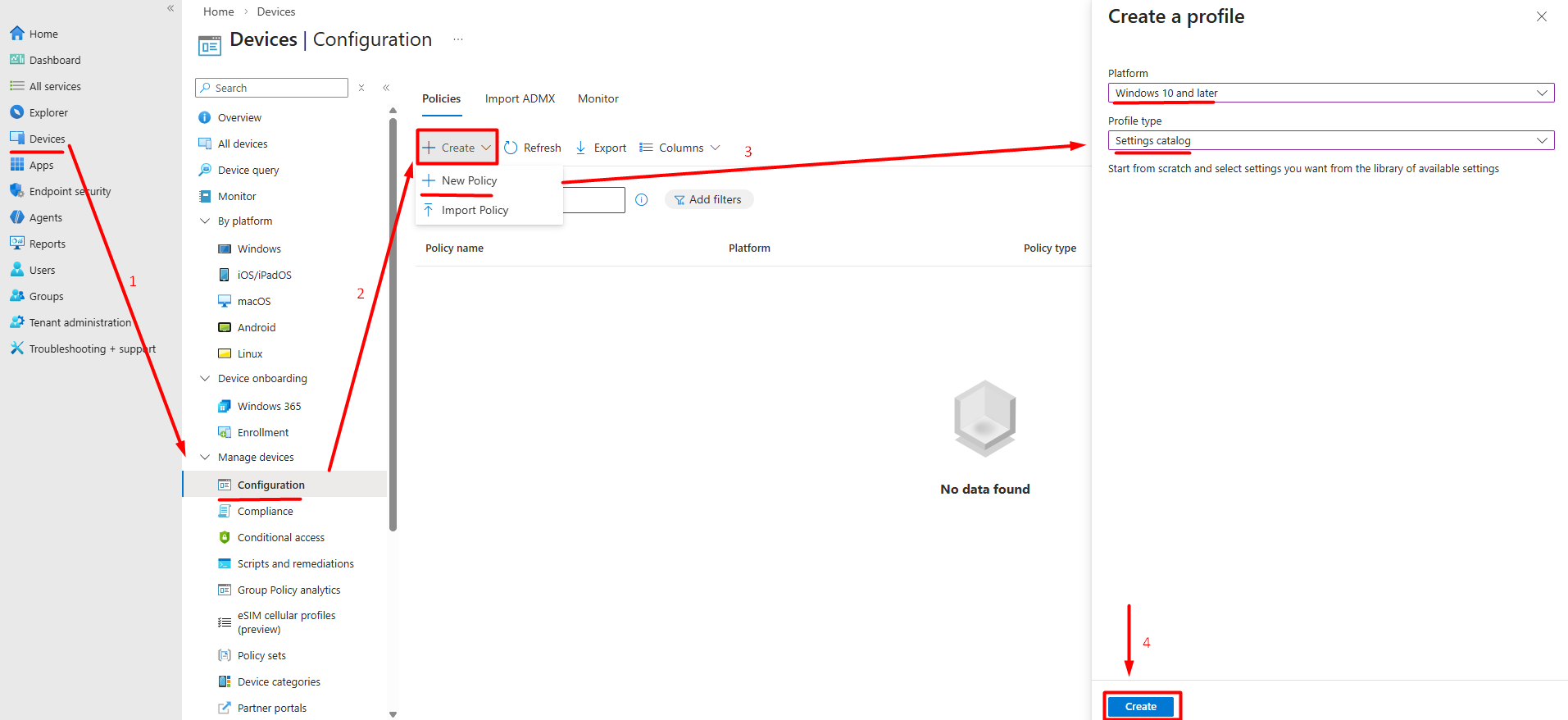
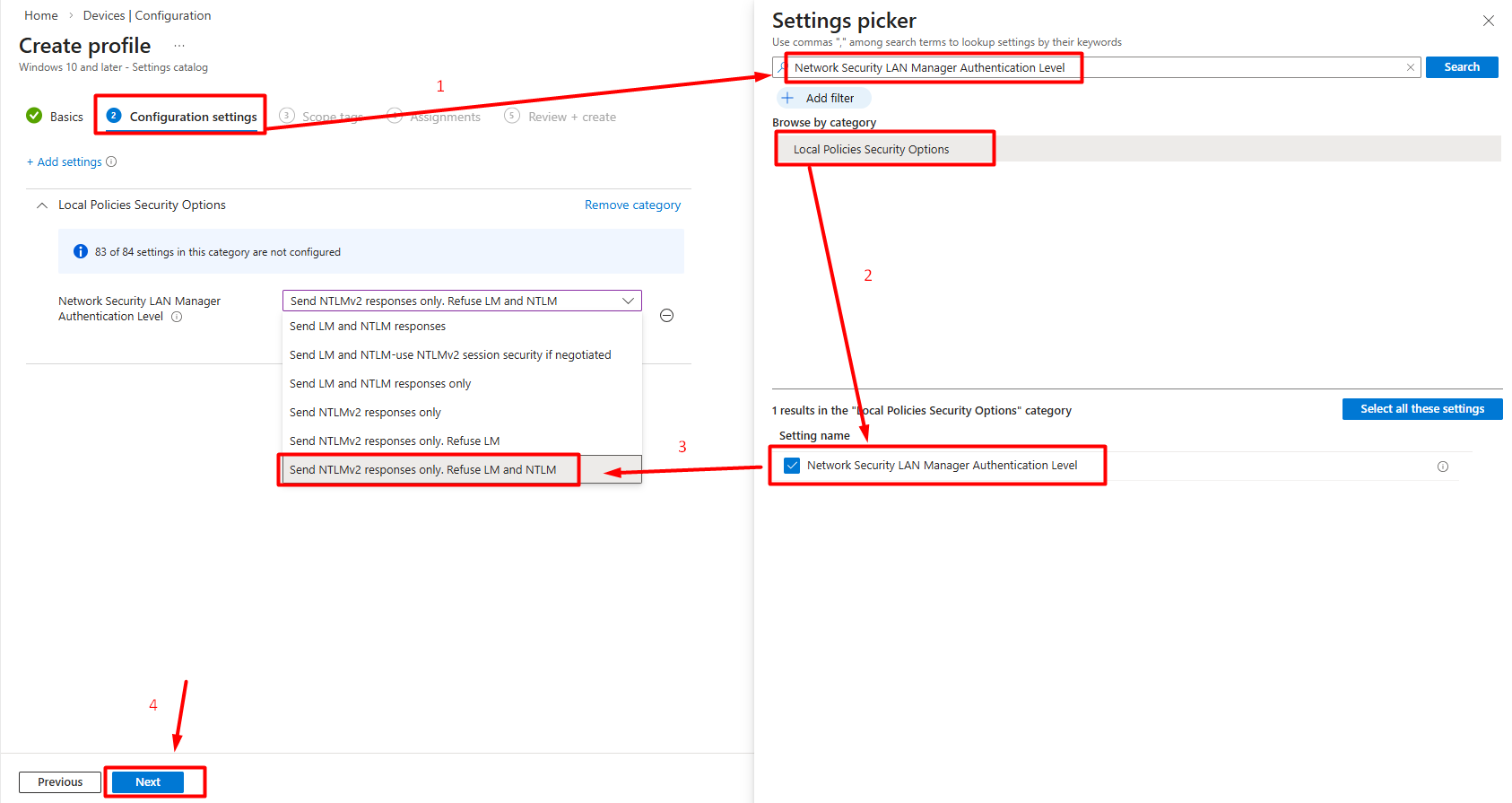
Locate the Network Security LAN Manager Authentication Level setting.
Set the value to Send NTLMv2 response only. Refuse LM & NTLM and complete the remaining steps by clicking Next.
Custom OMA-URI:
Alternatively, the registry setting can be applied directly via a custom profile:
In the Intune admin center, navigate to Devices > Configuration > Create > New Policy.
Select Windows 10 and later as the platform, Template as the profile type, and then Custom.
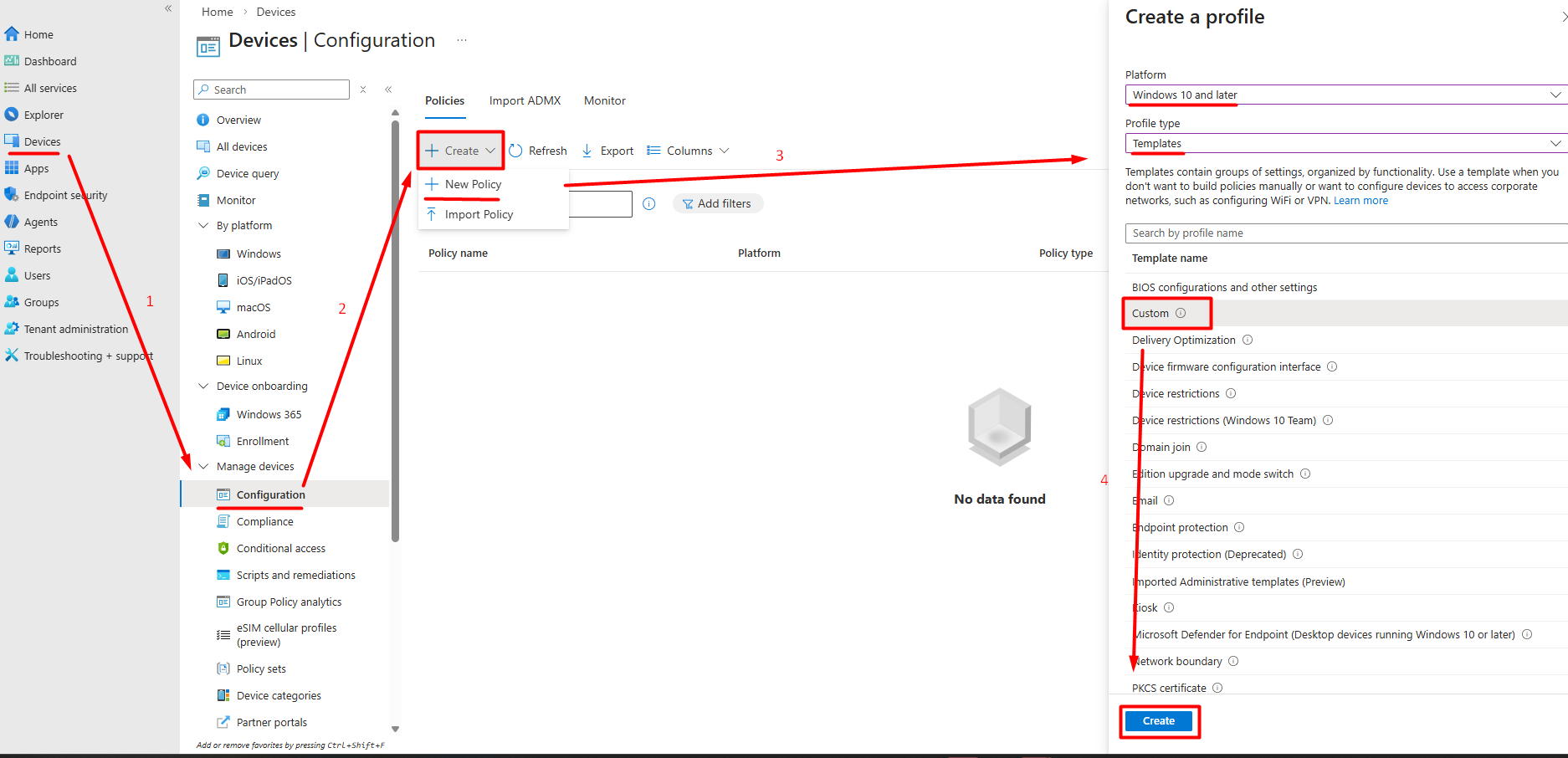
In the Configuration Settings step, follow the Add Row path. Enter the following values on the screen that appears. The registry setting is directly applied.
Name: LmCompatibilityLevel
OMA-URI:
./Device/Vendor/MSFT/Policy/Config/LocalPoliciesSecurityOptions/NetworkSecurity_LANManagerAuthenticationLevelData type: Integer
Value:
5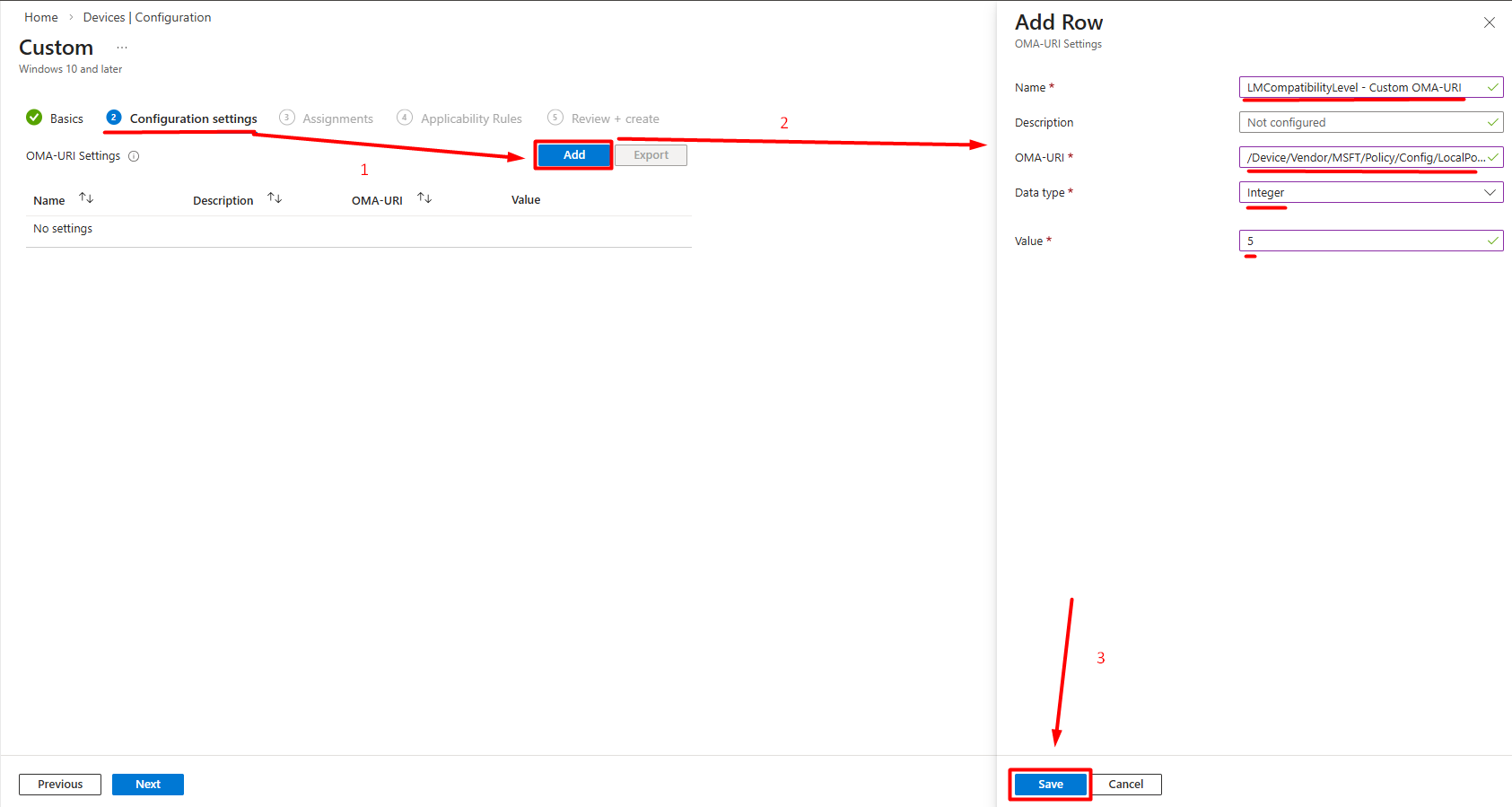
Hybrid Azure AD Join / Entra ID Join Scenarios: Cloud-managed devices require DC access for Kerberos. NTLM fallback may occur on remote devices operating without VPN or Always On VPN since Kerberos cannot be used. In this case, IAKerb or cloud trust configuration should be evaluated.
In environments with multiple forests or domain trusts, disabling NTLMv1 requires additional attention:
- Cross-forest NTLM: Authentications over forest trusts may fall back to NTLM instead of Kerberos. This is particularly common in trusts using selective authentication.
- Different LmCompatibilityLevel values: The trusted forest may have a low
LmCompatibilityLevelvalue, in which case cross-forest NTLM traffic may occur as NTLMv1. - SID Filtering: When SID filtering is active on trusts, some Kerberos tickets may be rejected and NTLM is used.
Recommended approach:
LmCompatibilityLevelvalues in all trusted forests/domains should be verified.- Cross-forest 4624 logs should be analyzed to detect NTLM usage.
- Level 5 should be applied in both the source and target forests to block NTLMv1 traffic over trusts.
Rollback Plan
Unexpected authentication issues may occur after enforcement. The following steps should be prepared for quick rollback:
- GPO settings are reverted: The
LAN Manager Authentication Levelpolicy is returned to its previous value (Send NTLMv2 response only) or set toNot Configured. - Registry cleanup: Even if the GPO is set to
Not Configured, theHKLM\System\CurrentControlSet\Control\Lsa\LmCompatibilityLevelvalue may remain on the system. If necessary, this key is manually removed or reverted to its previous value. - Forced gpupdate: After rollback,
gpupdate /forceis run on affected systems to ensure the policy is applied immediately. - Log monitoring: After rollback, 4624, 4776, and 8001-8004 events are monitored to verify that the authentication flow has returned to normal.
4. Monitoring
After the enforcement process is also completed, the monitoring process should continue with the rules previously created. This way, a different system attempting to use NTLMv1 can be detected, or attackers attempting NTLMv1 can be identified.
5. Implementation Checklist
The following checklist can be used for complete tracking of the NTLMv1 disabling process:
Audit Phase:
- Are 4624 logs being collected from all servers and endpoints?
- Have Restrict NTLM audit policies been enabled? (8001-8004 Event IDs)
- Have users, service accounts, and systems using NTLMv1 been identified?
- Has NTLM traffic coming through cross-forest / trusts been analyzed?
- Have Kerberos fallback causes (missing SPN, duplicate SPN, IP access) been investigated?
Remediation Phase:
- Have applications using NTLMv1 been updated or replaced with alternatives?
- Have third-party devices (NAS, printers, Linux/Samba) been migrated to NTLMv2 support?
- Have SPN issues been resolved?
- Have exception records been created for systems that cannot be migrated?
Enforcement Phase:
- Is the rollback plan ready and tested?
- Has
LmCompatibilityLevel = 3(or higher) been applied on clients? - Has
LmCompatibilityLevel = 5been applied on servers? - Has
LmCompatibilityLevel = 5been applied on DCs? - Has
LmCompatibilityLevel = 5been applied on clients? - Have Intune/MDM managed devices been configured?
- Has Credential Guard been enabled?
Monitoring Phase:
- Has a continuous monitoring dashboard been created in SIEM?
- Has NTLMv1 traffic dropped to zero in 4624 logs after enforcement?
- Has it been verified that legacy GPOs are not downgrading modern systems?
6. Project Timeline
The following timeline is a reference framework for an NTLMv1 disabling project in a medium-to-large enterprise environment. Durations may need to be adjusted based on environment size, number of legacy systems, and team capacity.
Phase 0 — Project Initiation and Preparation (Weeks 1-2)
| Task | Owner | Duration |
|---|---|---|
| Identifying project stakeholders | Project Manager | Week 1 |
| Defining project scope (domain, forest count, trust structure) | AD Team | Week 1 |
| Creating and documenting the rollback plan | AD Team | Weeks 1-2 |
| Preparing the communication plan (affected teams, announcement schedule) | Project Manager | Week 2 |
Inventorying existing LmCompatibilityLevel and NTLM GPOs |
AD Team | Week 2 |
Phase 1 — Audit and Discovery (Weeks 3-6)
| Task | Owner | Duration |
|---|---|---|
Enabling 4624 Audit Logon policy on all systems |
AD Team | Week 3 |
| Enabling Restrict NTLM audit policies on all systems | AD Team | Week 3 |
| Forwarding logs to the centralized collection infrastructure | SIEM Team | Weeks 3-4 |
| Creating the NTLMv1 usage report (per user, system, application) | Security Team | Weeks 4-5 |
| Analyzing cross-forest / trust NTLM traffic | AD Team | Week 5 |
| Detecting SPN issues and analyzing Kerberos fallback causes | AD Team | Weeks 5-6 |
| Network-level NTLMv1 scanning (Wireshark/NDR) | Network Security Team | Weeks 5-6 |
Phase 2 — Remediation (Weeks 7-14)
| Task | Owner | Duration |
|---|---|---|
| Updating applications using NTLMv1 or migrating to alternative solutions | Application Teams | Weeks 7-12 |
| Ensuring NTLMv2 compatibility of third-party devices (NAS, printers, Samba, etc.) | Infrastructure Team | Weeks 7-10 |
| Applying SPN fixes | AD Team | Weeks 7-8 |
| Creating exception records for systems that cannot be migrated to NTLMv2 | Security Team | Weeks 10-12 |
| Applying network isolation and compensating controls for exception-scoped systems | Network / Security Team | Weeks 11-14 |
| Cleaning up legacy / conflicting GPOs | AD Team | Weeks 8-9 |
Phase 3 — Pilot Enforcement (Weeks 15-18)
| Task | Owner | Duration |
|---|---|---|
| Selecting pilot OU/group (low-risk server and client group) | AD Team | Week 15 |
Applying LmCompatibilityLevel = 3 to clients in the pilot group |
AD Team | Week 15 |
Applying LmCompatibilityLevel = 5 to servers in the pilot group |
AD Team | Week 16 |
| 1-week monitoring — 4624 logs and user feedback | Security Team | Weeks 16-17 |
| If issues exist: remediation; if not: expansion approval | All Teams | Weeks 17-18 |
Phase 4 — Production-Wide Enforcement (Weeks 19-24)
| Task | Owner | Duration |
|---|---|---|
Applying LmCompatibilityLevel = 3 to all clients (in waves) |
AD Team | Weeks 19-20 |
Applying LmCompatibilityLevel = 5 to all member servers (in waves) |
AD Team | Weeks 20-21 |
Applying LmCompatibilityLevel = 5 to DCs |
AD Team | Week 22 |
Applying LmCompatibilityLevel = 5 to all clients (in waves) |
AD Team | Week 22 |
| Configuring devices managed via Intune / MDM | Endpoint Team | Weeks 19-21 |
| Enabling Credential Guard (on supported systems) | Security Team | Weeks 20-22 |
| Post-wave monitoring and escalation | Security Team | Ongoing |
Phase 5 — Stabilization and Continuous Monitoring (Week 25+)
| Task | Owner | Duration |
|---|---|---|
| Creating a permanent NTLMv1 monitoring dashboard in SIEM | SIEM Team | Week 25 |
| Automating weekly NTLMv1 usage reports | Security Team | Week 25 |
| First periodic review of the exception list | Security Team | Weeks 25-26 |
| Project closure report and lessons learned documentation | Project Manager | Week 26 |
Note: This timeline is a reference framework. It can be shortened for smaller environments and will naturally extend for larger and more complex environments. What is critical is that each phase is based on the outputs of the previous phase and that no phase is skipped.
7. Success Metrics and KPIs
The following metrics should be tracked to measure the success of the NTLMv1 disabling project and report progress to the management layer:
Primary Metrics (Mandatory):
| Metric | Target | Measurement Method |
|---|---|---|
| NTLMv1 Event Count | 0 (zero) | NTLM V1 record count in logs |
| Enforced System Ratio | 100% | Systems with LmCompatibilityLevel ≥ 3 / total systems |
| DC Enforcement Ratio | 100% | DCs with LmCompatibilityLevel = 5 / total DCs |
| Active Exception Count | Decreasing trend | Number of records in the exception list |
Secondary Metrics (Recommended):
| Metric | Target | Measurement Method |
|---|---|---|
| Mean Time to Detect (MTTD) | < 24 hours | Time to detect a new NTLMv1 source in SIEM |
| Exception Resolution Rate | Increasing trend | Resolved exceptions / total exceptions (quarterly) |
| Kerberos Fallback Rate | Decreasing trend | Trend of failed / anomalous requests in 4769 events |
| Remediation Completion Rate | 100% | Fixed dependencies / detected dependencies |
Important: After enforcement, the NTLMv1 event count is expected to remain consistently at zero. Any increase indicates that a new dependency has emerged, a configuration drift has occurred, or a system outside the exception scope is using NTLMv1, and should be investigated immediately.
New NTLM Audit Logs
NTLM audit capabilities have been enhanced with Windows 11 24H2 and Windows Server 2025. More detailed logging capabilities have been introduced for clients, servers, and Domain Controllers. These logs (4020, 4021, 4022, 4023, 4030, 4031, 4032, 4033) make NTLM authentication traffic more visible and facilitate the detection of NTLMv1 dependencies.
Important Note: The 4032 event log generated on Domain Controllers can accelerate the NTLMv1 analysis process. Thanks to this log, analysis can be performed without enabling the 4624 log on all clients and servers.
The new log records enable security teams to answer the following questions more clearly compared to the existing logging structure:
Who is using NTLM; it makes the account, related machine, and process visible.
Why is NTLM being used; it reveals the reason for choosing NTLM over modern protocols such as Kerberos.
Where is the NTLM authentication occurring; it provides connection details such as the machine name and IP address.
The enhanced log records also generate information about NTLMv1 usage on the client and server side, while also enabling domain-wide NTLMv1 usage monitoring on Domain Controllers.
The relevant logs can be viewed in the Event Viewer application at Event Viewer > Applications and Services Logs > Microsoft > Windows > NTLM > Operational.
The enhanced NTLM logs on the client and server side are managed through the settings at Computer Configuration > Policies > Administrative Templates > System > NTLM > NTLM Enhanced Logging.
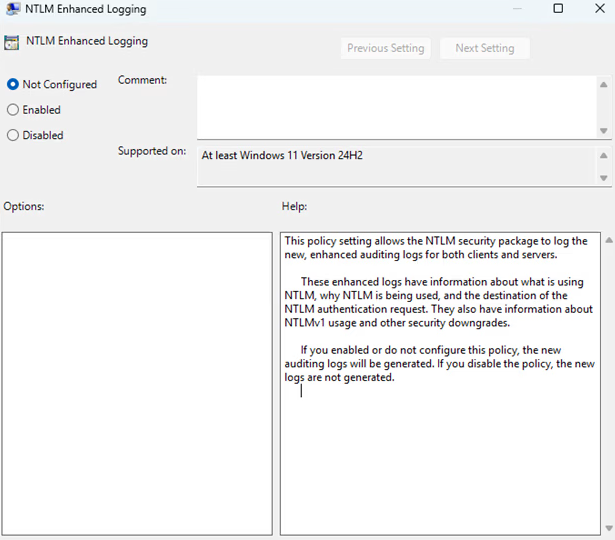
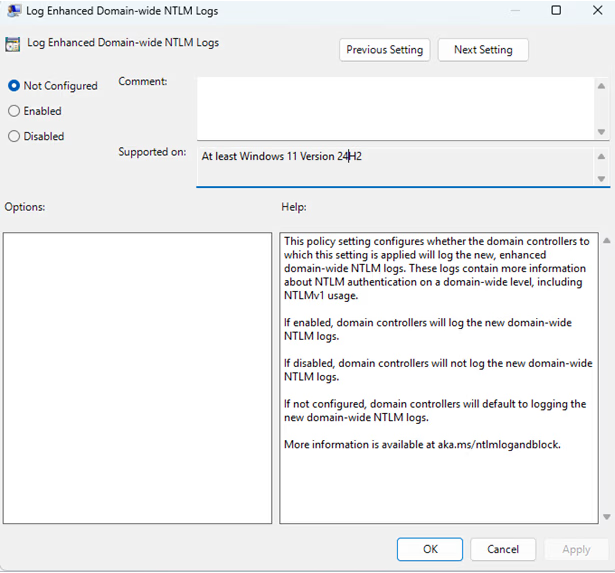
The domain-wide enhanced NTLM logs are controlled through the following policy on the Domain Controller.
Domain-wide NTLM logs are managed through the settings at Computer Configuration > Policies > Administrative Templates > System > Netlogon > Log Enhanced Domain-wide NTLM Logs.
| Event ID | Event Name | Pros | Cons |
|---|---|---|---|
| 4776 | Credential Validation | Only requires log collection from domain controllers. Can be used to baseline the amount of NTLM authentication in the domain. Can be used to identify "top NTLM using" accounts. | Only provides the client (workstation field) and the authenticating username. The event does not show the accessed resource. Does not contain any information about the NTLM version. |
| 4624 | An account successfully logged on | Logs the authenticating user, client name, and the accessed server. Also logs the negotiated NTLM version. | Requires event collection from all domain-joined devices hosting resources. Does not provide information about the process or application using NTLM. |
| 8001-8006 | An account used NTLM for either inbound or outbound authentication | Logs the authenticating user, client name, server name, and the names of processes using NTLM. Can be used to identify accounts and devices that do not have a dependency on inbound or outbound NTLM authentication. | Requires event collection from all domain-joined devices to comprehensively understand NTLM usage in the domain. However, collecting only domain controller events (8004) will still provide the authenticating user, client name, and server name for domain authentication. |
| 4001-4006 | NTLM authentication was blocked | Logs when NTLM is blocked; allowing you to detect any unintended impact. | Requires event collection from all domain-joined devices to comprehensively understand blocked NTLM authentications. |
| 4020,4022,4030,4032 | An account used NTLM for either inbound or outbound authentication | Provides very detailed information about NTLM authentications including the process name, negotiated flags, and the reason for NTLM fallback. | Only supported in 24H2 / 2025 and later versions. Requires event collection from all domain-joined devices to comprehensively understand NTLM usage in the domain. |
| 4021,4023,4031,4033 | NTLM authentication was blocked | When NTLM is blocked, contains more detailed information compared to the 4001-4006 events. | Only supported in 24H2 / 2025 and later versions. Requires event collection from all domain-joined devices to comprehensively understand blocked NTLM authentications. |
References
- https://attack.mitre.org/techniques/T1550/
- https://learn.microsoft.com/en-us/previous-versions/windows/it-pro/windows-10/security/threat-protection/auditing/event-4624
- https://learn.microsoft.com/en-us/archive/blogs/miriamxyra/stop-using-lan-manager-and-ntlmv1
- https://techcommunity.microsoft.com/blog/coreinfrastructureandsecurityblog/active-directory-hardening-series---part-1-%E2%80%93-disabling-ntlmv1/3934787
- https://techcommunity.microsoft.com/blog/coreinfrastructureandsecurityblog/active-directory-hardening-series---part-8-%E2%80%93-disabling-ntlm/4485782
- https://learn.microsoft.com/en-us/archive/blogs/askds/purging-old-nt-security-protocols
- https://learn.microsoft.com/en-us/windows/security/identity-protection/credential-guard/
- https://techcommunity.microsoft.com/blog/windows-itpro-blog/advancing-windows-security-disabling-ntlm-by-default/4489526
- https://learn.microsoft.com/en-us/windows-server/security/kerberos/ntlm-overview
- https://learn.microsoft.com/en-us/windows-server/identity/ad-ds/manage/component-updates/network-security-restrict-ntlm
- https://learn.microsoft.com/en-us/troubleshoot/windows-server/windows-security/audit-domain-controller-ntlmv1
- https://learn.microsoft.com/en-us/mem/intune/configuration/settings-catalog
- https://support.microsoft.com/en-us/topic/overview-of-ntlm-auditing-enhancements-in-windows-11-version-24h2-and-windows-server-2025-b7ead732-6fc5-46a3-a943-27a4571d9e7b
Authors
- Serdal Tarkan Altun
See your identity exposure clearly.
Start with a 1-day Proof of Value in your own environment.